Category: Computing

Computer problems

  • It lives! At least a bit.

    So I went back to 4th Dimension Computers because the insurance co were unhappy with “it’s dead Jim” as the reason my PC was dead. I’d replaced the power supply when I got here with a brand spanking new one, because the one in it was irritatingly only rated for 240 volts.

    Having traded in the new supply, the machine refused to boot. And I’ve given away / recycled all the other supplies I had which were, to be fair, also only rated at 240 volts.

    So anyhow, I get there, and they’re very lovely and he pulls the plugs and tests the supply. Dead.

    He grabs a spare supply from the shelf and tests it. No boot. Computer’s still dead. He tests his supply – dead.

    He gets a third supply and tests it before connecting it… working. Connects it and… yes, the machine works. Which demonstrates that having spares around is handy. Unfortunately, now, having been apart so many times I’ve no idea which drive goes where in the case. So although it powers on and detects drives, it can’t boot. Which means I now need to create a rescue USB stick and try and correlate which drive is which to which port they were on before, then switch them around accordingly.

    I can see this being a fun game.

    …of course, to do that I need several things. A monitor and a keyboard would be a good start. It would also, probably, benefit from a USB WiFi adaptor, given that it’s not got a wired network to plug in to…

  • Yay! Unyay!

    I turned on my RiscPC and lo, “Thwooop” it went.

    Up popped:

    RISC OS 4.02

    And then things went a bit wrong as it ran out of memory (it used to have 64ish meg, now I think it’s got 12 thanks to death-of-battery), but it made it to the desktop.

    And then I discovered that like many modern LCD monitors, the one I’m borrowing to test things has little to no knowledge of ancient ‘puters. I think I may need a VGA to HDMI converter that’ll handle any input, because I suspect it’s switching to something like 50Hz 640×480, or some other hideous mode, and the monitor just cheerfully says “Mode not supported”.

    After a few abortive attempts to play games I thought “ah, but what about Xenon 2! That might work”.

    *Splutch*

    Oh well.

    Still, the 115v mode on the power supply seems to work, there were no hot or burny smells, I think that one counts as a win.

  • Smooth as a grit sandwich

    So I checked over the media server, spent ages making sure all the drives were plugged in correctly after shipping it over and then I turned it on. Well I tried to turn it on.

    Dead.

    I checked it over and made sure that all the connectors were definitely well seated, that there were no untoward bits of crap floating around, that nothing was obviously amiss.

    Dead.

    I stripped it down to just the mainboard / processor / memory / GFX card.

    'It's Dead Jim' -- Bones McCoy

    I stripped it down to just the mainboard / processor / memory.

    So that’s another thing I’ll have to claim on the insurance.

    Sadly, the phrase ‘woefully under insured’ springs to mind. When we got towards the end of the insurance items list we were starting to realise that we were running out of money to actually ship the damn stuff. So it’s only insured for around $400 (most of the other computers I shipped over I could ask lovely John to find a free replacement for, and then just ship over). That’s not enough to replace the hard drives in it, because it’s got “quite a lot of storage”. I’m thinking that if I replace the mainboard, processor, memory and at least one HDD I should end up with a working machine. Hopefully, whatever’s killed it didn’t kill all the hard disks, otherwise I will be a very, very sad bunny.

    Thankfully, the cost of parts for an FM2+ machine isn’t way high, so even with the fairly low level of insurance I should actually be able to get a working machine again. How quickly, though, that’s another entire question.

    I am, however, considering the possibility that it might be time to get a new case while I’m at it. If I’m throwing a new motherboard in, I might as well have a case that actually can hold a few more drives to put it in.

    It’s quite frustrating. Not least because I was really looking forward to having our video server back online, and listening to podcasts again.

    Tomorrow is, I think, claim day.

  • In theory

    …pyoor.org is back up and running.

    Of course, that is just a theory.

  • As planned, then not quite as planned

    Not that there was a plan. But yesterday actually seemed to go okay. Spent the evening offering my nursey services for free. There’s a volunteer run clinic here in Oly, for people who’ve got no health coverage. And I spent the evening shadowing another nurse, although realistically I could have stepped in to start work after the first patient. It’s triage, it seems to be the same the world over. Apart from the fact that I suddenly have to recall my 12 times table for frickin’ inches, because every-damn-person gives their height in feet and inches.

    And also Fahrenheit. Bloody Fahrenheit. Gah.

    But other than that, it was peachy. And it happens the computer translates when you enter it, so I actually can use my nursey-sense when I look at the temperature in centigrade. It’ll come, when I get some practice, but it’s just when I look at a temperature in fahrenheit, or a height in inches, it means very little to me at the moment.

    To be fair, we switched units on our blood gas analyser at the place I used to work, and it took me a little while, but fairly soon after we were forced given the opportunity to switch over I was happy with the new units. It’ll come.

    Also yesterday I tried to make clotted cream. About $8 worth of cream got cooked for about 12 hours at 185°F / 85°C… I think it’s a bit long. Taste wise, I think it’s not far off. But texture wise, it’s positively crumbly. Which is a shame. I think maybe a couple less hours in the oven, maybe a bit more of the runny milky stuff that I strained off (and used to make the scones. Healthy, huh).

    Still, it’s a step up on the stuff that we got from the shop. That was positively not right too.

    Today, though, apart from the scones which are a smidge over done has been a little tricky. Pyoor.org, the actual home of my entirely narcissistic blog (no matter where you’re reading this) today got flagged by a friend as potentially having been hacked and showing up as having malware on it. After much dinking, I now think it’s probably server misconfiguration – and am waiting for the company that I use who do the underlying configuration (yes, I am now that lazy – or I admit that this is not what I’m spending my time doing, and therefore not ideally placed to keep it up to date). But that took a while, and lots of tedious fiddling.

    I’m hoping I’ve not broken anything in the interim.

    So yuh.

  • Wakey Wakey

    Sometimes my tired old MacBook won’t wake from sleep.

    Lets be honest, there are lots of things it won’t do anymore, including ‘staying switched on’, sometimes.

    But one of those things is that if it’s left open and goes into sleep mode, sometimes it won’t wake up. It clearly starts to, the fan kicks in, the screen flickers briefly, then it just sits. I’ve tried leaving it – sometimes it’ll stay like that for a very long period (at which point I usually power cycle it), sometimes it crashes and reboots itself. It does appear on the network, but SSH et al. don’t seem to be up at the point at which it stops. So it seemed, until today, rebooting or waiting for a crash were the only options.

    But yesterday I had a brief dink with a network app on my phone – when for some inexplicable in the reason the router decided to tell everyone it was connected to the internet, but not actually be connected. Or at least, not sharing the internet-love with the devices in the house. And I wasn’t sure, initially, if it was my flakey laptop, or the router. Things were generally being odd. So I used the networking tools app on the phone. And lo, it was the router, and lo, it was rebooted. Everything was good.

    But it clearly stuck in my head that I could send ‘Wake on Lan’ signals via the app, because when the MacBook wouldn’t come on, I remembered that I could send it a wake-up from the phone.

    And lo, it worked.

    And I was stunned.

    So yay for small victories.

  • Damn evil technology

    So – years ago I bought a TV capture box. A relatively nice one. A Miglia Evolution TV. All brushed aluminium and shiny. They went bust, and so software support was discontinued with OS X 10.4.

    …which means that for all its shiny shiny, it doesn’t work. At all. Current versions of OS X don’t know how to talk to it and won’t let you even install the drivers.

    Which is upsetting.

    So I bought a cheap USB capture device from t’internet.

    Because, y’see, back in days of yore when this was all fields, and so on, there was an actual incompatibility between videos sold in the US and those sold in the UK. UK VHS videos were PAL – 625 glorious interlaced lines at 25 frames per second, and US ones were a somewhat lower res 525 lines, but a slightly faster frame rate of 30 frames per second.

    Now, in the grand scheme of things, I largely don’t give a monkeys. At this point in history nearly all video cassettes have been consigned to landfill or plastic recycling. However, I’ve four cassettes – and actually a fifth containing a film that shows no signs of coming out on DVD – that I’d like to capture.

    So I found a spare old tape to test it with and after freeing the motors off a little cerchunky-whirry:

    Then I had to find the video cables for it. Because it uses SCART, which is a wildly convenient standard if you’ve got a SCART cable going into another SCART device. Less so if not. But, today I located (in the bucket of wires) my SCART to S-Video adaptor cable.

    Hurrah!

    Only not.

    Because I can’t get the tracking good enough for the crappy cheap USB capture stick. If I plug the video into the telly it’s VHSarrific. A bit wobbly, in the way that VHS sometimes was, but not unwatchably so. And fuzzy, in the way that I’d forgotten how bad VHS was. But otherwise… it works.

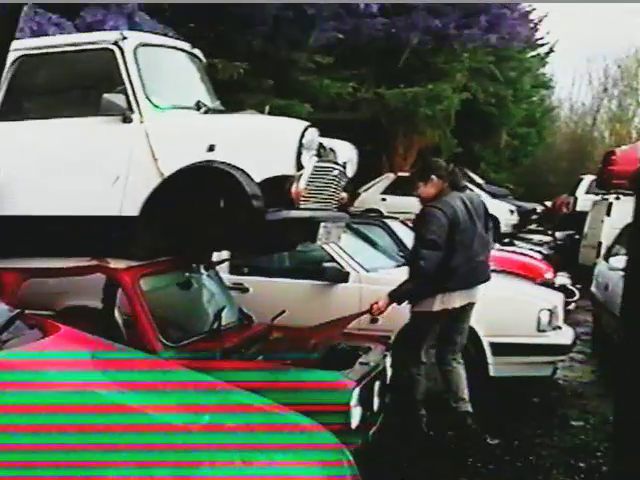
    Plug it in to the capture card and it is unwatchable. 2005 Video for Granada TV

    Imagine that high quality image flickering about all over the shop. It’s dreadful.

    Now, the question is, is this something that possibly a better video recorder (like lovely John has) might fix, or is it something that is a sign of such a flawed USB capture stick that it won’t work even then.

    Hopefully we shall find a solution. Not, of course, that I’m sharing this wonderful Promo that Nikki and I made for Granada. Oh no. Although, it’s quite entertainingly bad.

  • Okay google

    So, on my OnePlus One, “OK Google” is a bit flakey. It seems to work best if I sound slightly exasperated (which may relate to how I sounded by the time I’d trained it), and is waaay more reliable if the phone is unlocked. “OK OnePlus” which is meant to unlock it is hilariously useless, incidentally. I’ve never, ever, ever got it to work and it took so many goes to ‘train’ it that I’ve basically given up. I keep hoping it’ll get fixed, but since they delayed shipping the OS for *ages* for a feature which essentially doesn’t work at all, I’m not overly optimistic.

    However. Okay Google works with enough effectiveness that I do use it – more through enjoyment of the fact I can do it, and wilful determination to make use of the feature. It’s handy for setting timers when I’m cooking or finding out if it’ll rain as I’m heading out.

    But I really struggle with not saying please.

    You watch all these videos, and people are talking to Echo or Siri or Google and they don’t say please. I rarely say please to it, because I’ve usually taken several goes to persuade it to work and don’t want to throw out the request with giving it extra speech to recognise, but each time I don’t I feel atrociously rude.

    I wonder if that’s just me though.

  • Suck it up

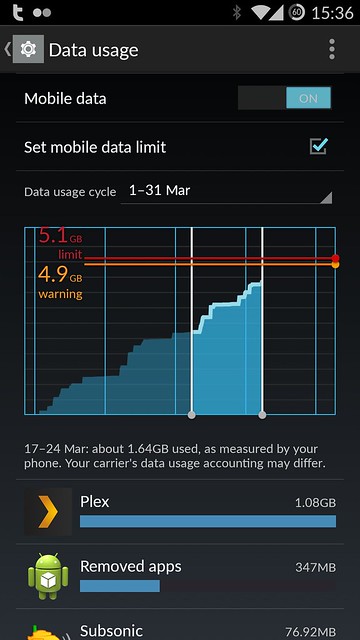
    So, I like Plex. I like it a lot; it does a lot of things very well. Unfortunately, one of the things it doesn’t do is allow you to limit data usage on audio tracks. This is ‘unfortunate’ – and somewhat of an oddity, at least as far as I’m concerned.

    Data use...

    This is a problem because I don’t have unlimited data. I’ve got what I thought was fairly generous 5 Gb allowance, but over the month Plex has sucked up over 2.5Gb of that on just a few hours of use.

    Having scoured the forums, lots of people have commented that it’d be nice to have a transcode-to-lower-data-rate function, but there seems to be no enthusiasm to add it – which is odd, because the thing I (and a lot of people, seemingly) do the most is listen to audio. I rarely watch video on my mobile; so the fact it transcodes it down to use a lower data rate is nice, but not desperately important to me. Then, whilst I was poking around looking for an answer I came across Subsonic.

    Having installed it this morning I can say a few things:
    – It has some really nice features (like handling podcasts) which may mean I can finally completely dump iTunes.
    – It’s not nearly so cuddly as Plex.
    – It weirdly could find all the tracks but failed to add them properly to the database because I pointed it at the disk with them on, not the (two layers down) subdirectory with the audio-file directories in.*
    – It’s installation and FAQ information could do with some Technical Writerly assistance (most of it was fine, but I spent ages trying to work out why it was generating the error “Sorry, you are not authorized to perform the requested operation” when I tried to access any music folders before realising that I hadn’t cleaned the database after scanning them with the wrong file locations.
    – It’s also much cheaper than Plex.

    However, it does allow me to tweak the audio settings down for Mobile Data separately to WiFi, which means that since usually I’m listening to it in the car, or while walking, and I don’t need my much higher quality audio, I should be able to feel a bit more comfortable about the amount of data I’m using.

    Anyhow, we’ll give it a go for the month and see how things go – if they go well, then that’ll be an actual subscription service I’ll need to pay for (but at $1 a month, I think I’ll cope :) ).

    * I pointed it at “/media/Delia Derbyshire” which is the disk that houses all the audio files (obviously). However, it wanted to be pointed at “/media/Delia Derbyshire/Audio/…” (…=Clean Rips, or …=Digital Downloads, or …=Dirty Old MP3s).

  • Just in case any one else is completely flummoxed

    So there I was having got to a “Until Ubuntu fix the massive honking great bug, I don’t really need to footle with the media server” place. And I sat down with a book and said to the Squeezebox in the lounge, play this album.

    It went “Of course….No”.

    Not that it did it in a useful way, oh no.

    Not in a providing me with debugging output that I could use way, no.

    It said “Can’t find file for:”. Which initially I thought might be a permissions problem. Then after some research I thought it might be a transcoding problem. Then I tweaked the debug logging settings and all it said was that it found the file I asked it to play. No error actually recorded. Then I upgraded having discovered there’s now versions released that are not Logitech’s own. That didn’t help either. Then eventually I was writing a long ‘help me please’ post on the slimbox forums when I thought “what the hell, I’ll try the ‘nightly’ build of the server software”.

    And lo, it worketh.

    So:
    Logitech Media Server 7.7.x Doesn’t work properly on Ubuntu 14.04 (Trusty Tahr) with early Squeezeboxes.
    Logitech Media Server 7.8.0 Also doesn’t work properly on Ubuntu 14.04 with early Squeezeboxes.

    The nightly build of Logitech Media Server (as of today 7.9.0~1423739099) seems to bring back FLAC (and I’d guess other transcoded formats) on early Squeezeboxes on Trusty Tahr. At least it has on my install. At this moment. I’m crossing my fingers for the future.

    Whilst the new media server is all shades of awesome, and having access to all my music as I travel places is pretty damn cool, this upgrade has not been an epitome of smoothness.