Category: Computing

Computer problems

  • Persuading Scrivener (3.5.1) to use your folder names as chapter titles

    Because I’m either insane or a masochist, having got Scrivener working yesterday I decided I was going to import my document from word and then attempt to produce an epub. Since that’s essentially what Scrivener is for me, a glorified epub/book pdf producer, since they don’t support Linux properly, and also don’t support Android – and I do all my writing on those two OS’s.

    OTOH, there’s a dearth of ‘cuddly’ Linux tools to produce decent epubs and PDFs for printing, so… here we are.

    If you’re actually writing in Scrivener, this next bit you might want to skip.


    Now, before we get into this properly, I also should say my “import docx” process also was a pain in the arse. Despite the document having separate sections defined for each chapter, and each chapter having a heading, e.g. Chapter 1 – It’s Definitely Just a Game, it singularly failed to correctly divvy that up into chapters. What I ended up doing was running through that document and throwing a # in front of every chapter title and using the “import and split” function, but rather than use the default “Split using document’s outline structure”:
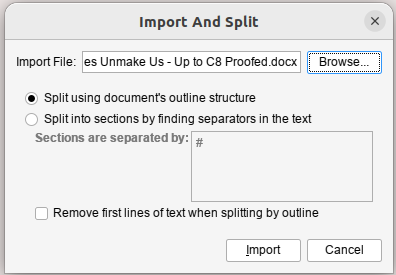
    Scrivener Import and Split window

    I selected “Split into sections by finding separators in the text”. The only problem with this is that for some reason it also picked up, seemingly only at the end of each chapter, the page number and included that in the text. So every chapter ended “Page nn”. I just fixed that by hand.

    Anyway, if you’ve actually written your document in Scrivener, that’s all kinda moot.


    Oookay.

    The recommended way to set up your books (although Scrivener are very much “you can do it how you like”) seems to be to have a folder for each chapter and then each scene in a separate Text. In my case because I imported a giant 120k word document, each chapter is one scene because I can’t be arsed to separate them.

    So you end up with something that looks a bit like this:
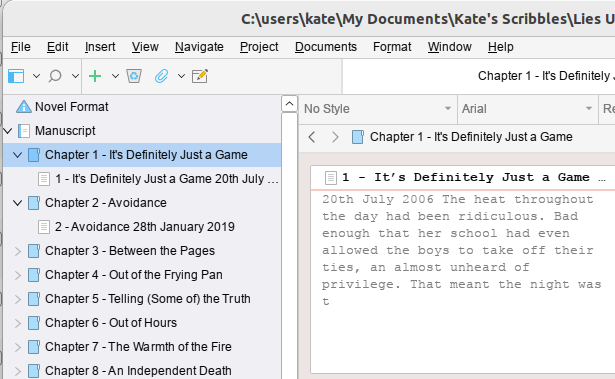
    Scrivener Main Window

    Now again, mine’s kinda funky because of the way I imported it. And my problem was that in my Text for each chapter, I had the chapter number and the title for the chapter and the subheadingy bit where I have the date (fractured timeline story, it hops about a lot). And what I wanted to do was have the chapter number and title as part of the Chapter Title, and then have the subheading-date as the Section Title.

    The solution to this would seem to be obvious. Change the Folder Name to the Chapter Title (in my case I just cut/pasted the Chapter Number and Title, but actually I’d probably suggest not doing it that way, and just putting the Title; y’know, in case you want to reorganise things in the future. I mean, my book is done apart from proofreading, so…hopefully it should now be fairly static).

    But then the epub that came out was…wrong. And finding the answer to “I would like my Folder names to be used as Chapter Names” turned out to involve a lot of wading through self righteous people explaining how you should read the manual and it’s all clear after that (it isn’t). And a lot of unanswered questions on multiple forums.

    So.

    The thing you need is indeed in the Compile Dialog. When you first open it it’ll probably look kinda like this – well, if you select “Compile for epub…” in the drop down menu at the top of the window:
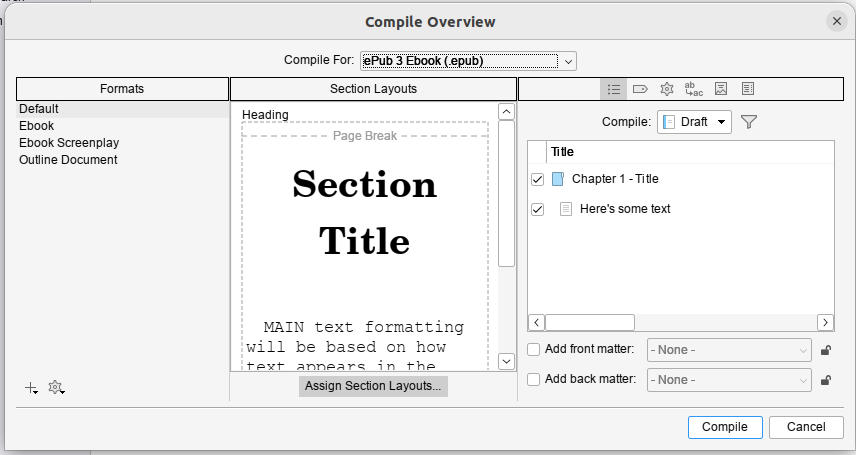
    Scrivener Compile Dialog

    Now I’m going to recommend you go with this plan, so you don’t fuck up the original version, although it’s a bit more involved.


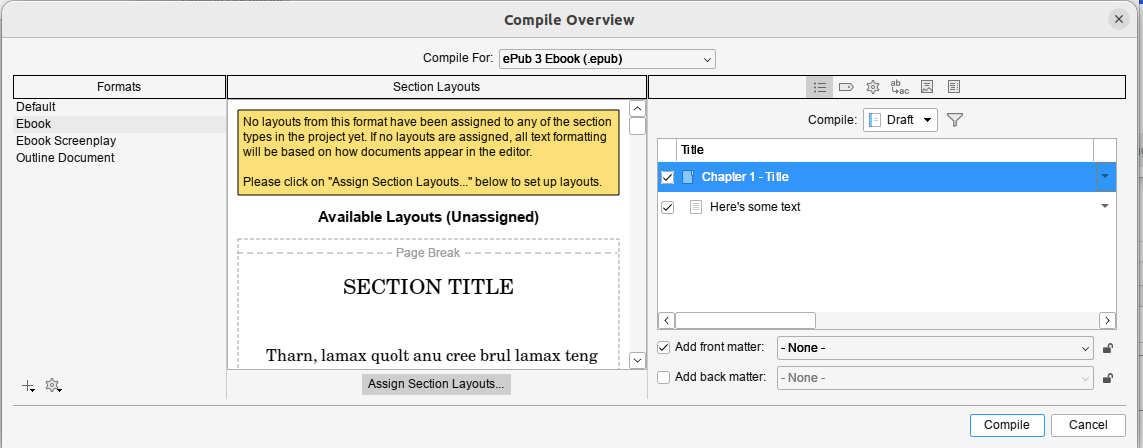
    But before we do that, when you click on ebook, if you get this error:
    Scrivener window with error

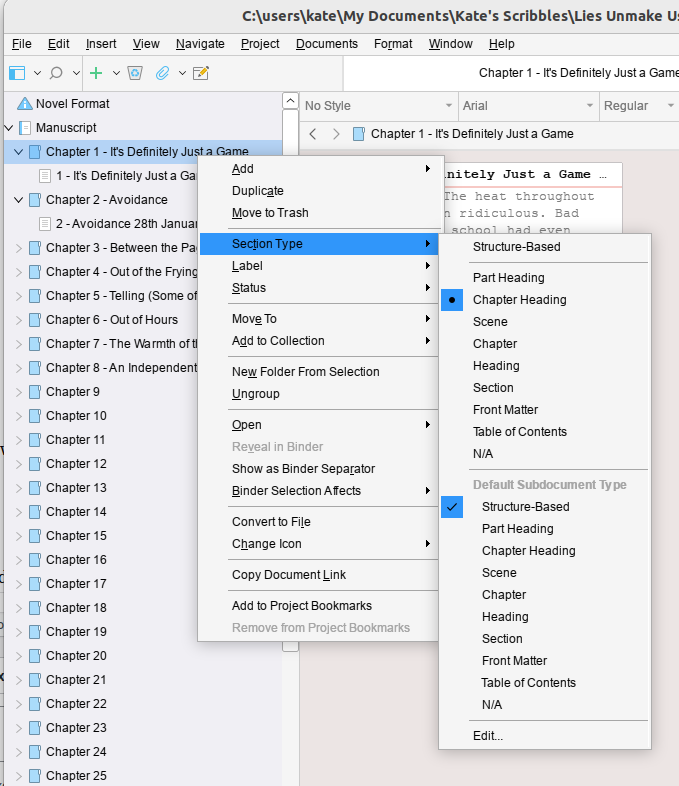
    Then you’ll need to cancel out of this dialog and go fix the assigned structure of your book. By default Scrivener sets this to “Structure Based” which I don’t yet know how it’s meant to work, but I can tell you it didn’t work for me.

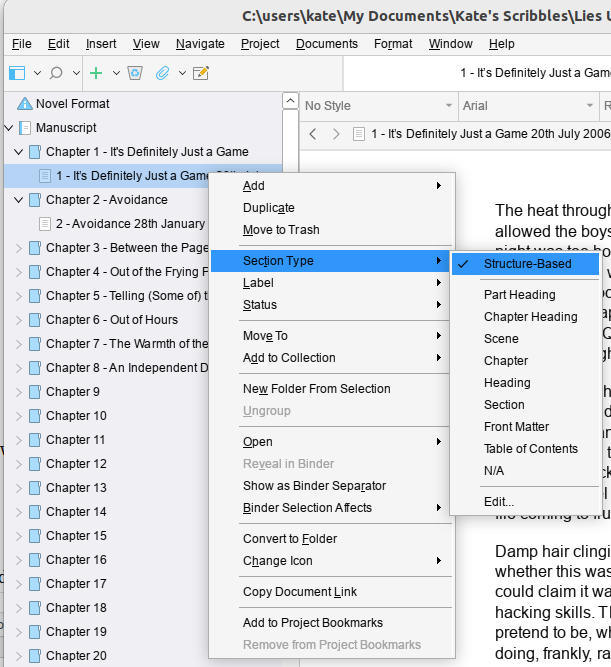
    I had to go set all the folders to Chapter Heading but got away with leaving the individual Texts as Structure Based. If you collapse the tree so all you can see is the folders you can multiselect (Click on the first one and Shift-Click on the last one) and then right click and set them all in one go).

    By the way, a reminder, this is really me flying blind and throwing things at the wall until they stick. This worked for me, eventually.


    Okay, so back you go to that Compile window and select ebook. Then in one of the Section layouts (the middle section of the window), click on the little grey edity pen icon that appears when you hover around the corners of the example layouts.

    Then, for the sake of your sanity, click “Duplicate Format & Edit Layout”; I called mine “Ebook Titles from Folders” because I’m deeply imaginative.
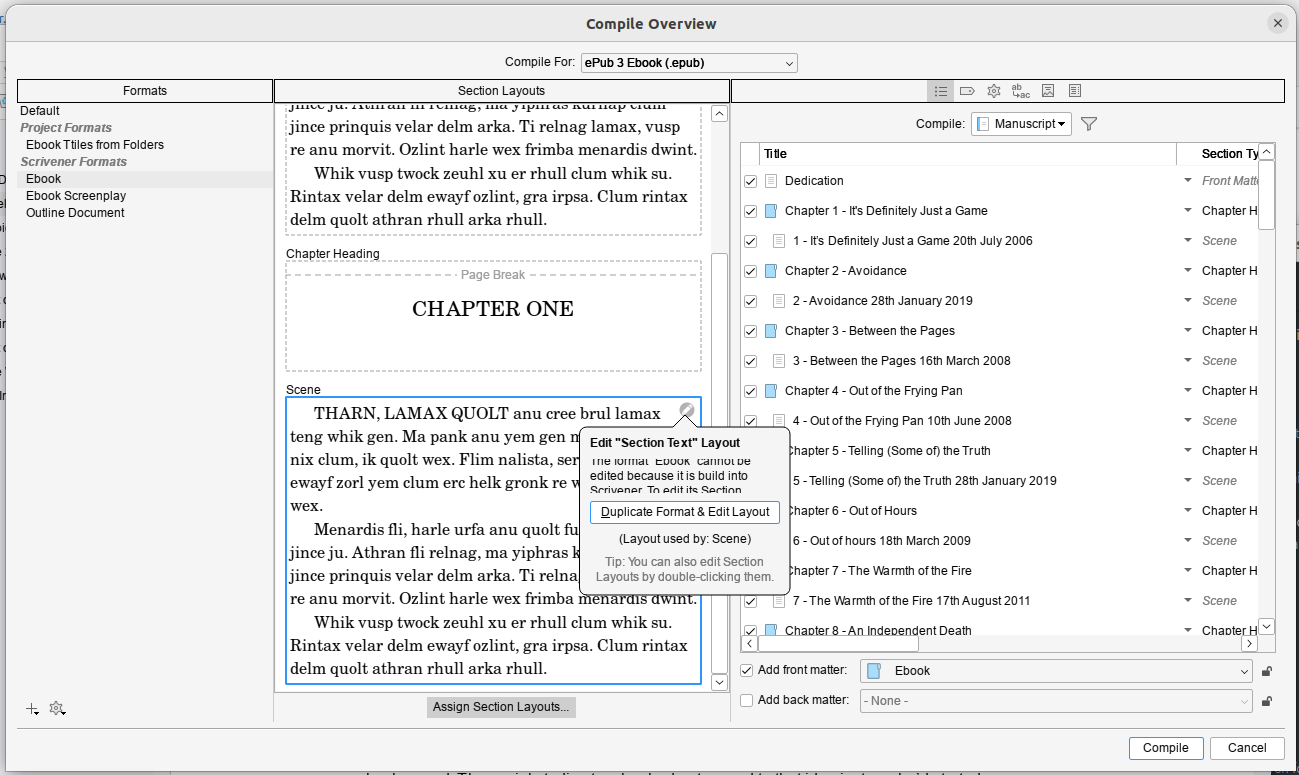
    Compile dialog from Scrivener with Duplicate Format and Edit Selected clickedOnce that’s done you need the little grey button at the center bottom of the Compile window: Assign Section Layouts…
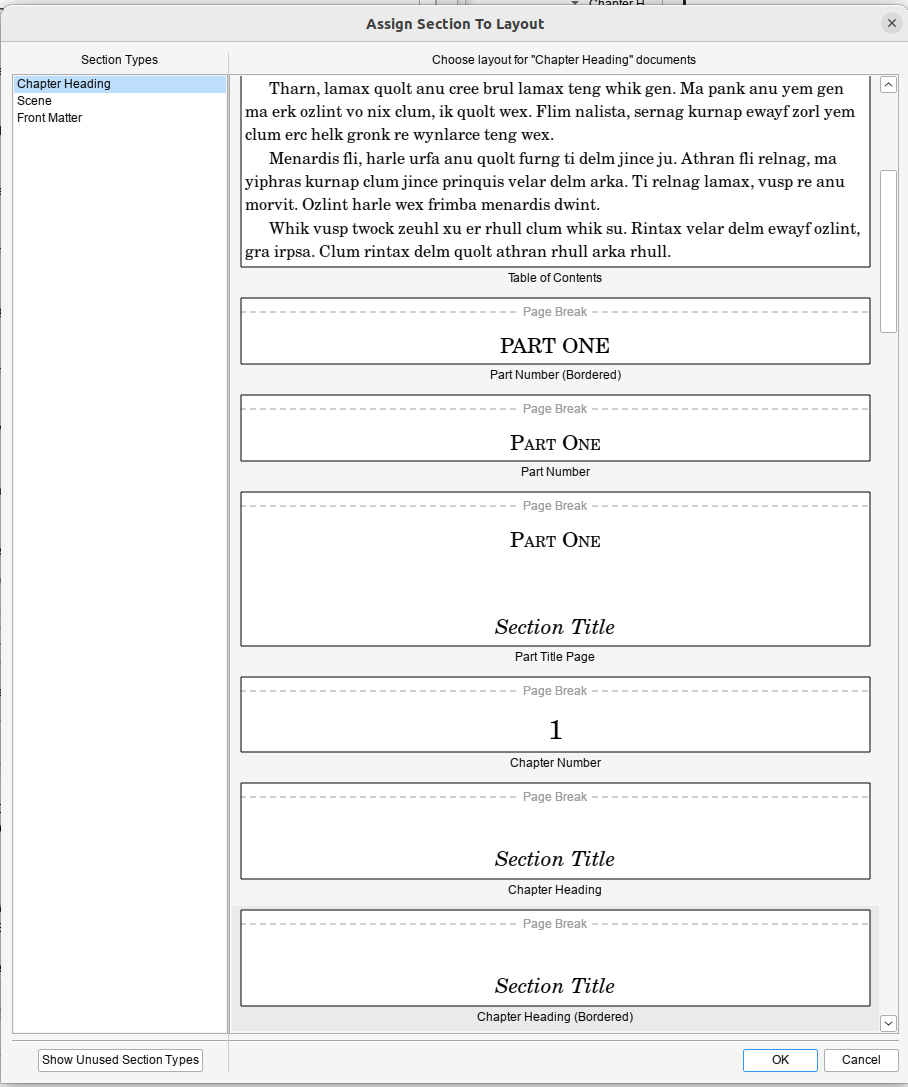
    Scrivener Assign Section LayoutsAnd then you need to assign a layout to each of the Section Types in the left hand pane. This is where it gets tricky, because I didn’t really understand what the examples were showing and it doesn’t provide a live example to show you based on how you’ve set things up. But my current understanding is that if you want your Folder Titles to be your chapter headings, you need to use Section Title. You can choose if you want a page break, or a border, or what have you. If you were wise enough not to hand-edit-in your chapter numbers, you might want a version that automatically inserts chapter numbers *and* a Section title, if that’s a thing you want.

    I ended up selecting Section Text for both Front Matter and Scene, and a Bordered Chapter Heading with Section Title for the contents for Chapter Heading:

    Section Layouts

    Obviously, if you want Back Matter, then you’ll also need to set that up. Since this was a ‘quick test’ I was doing to check that epub worked I’d thrown together a quick cover and used that.

    Anyhow, once you’ve done that, you can hit compile and you should end up with your folder titles as the chapter title…

    And thank fuck that’s done.

  • Scrivener 3.5.1 on Ubuntu Linux 22.04

    Scrivener seems like the best available option for epub production on Linux, so I decided to install it… There is a linked guide in the Scrivener forums (here) on which this is based, but Scrivener crashed twice during setup following it – several of the dialog boxes behaved very oddly – and when I got to the end of it I was presented with a black window that would, after a minute or so quit without doing anything. It took a bit of hunting around to work out why, and so here’s my version with the fixes I did.

    So, I’m going to basically nick the nice guide’s commands (because last time I didn’t do that, the guides then disappeared) – I’m not going to bother explaining the nice way the original author did, because you can read his nice post. He also has screenshots, because he’s a fancy duck. I’m not going to do that or install a VM to recreate the experience (because honestly, I can’t be bothered). Oh, and this is assuming you have an x86 based linux box*.

    I have presented this in more or less the order I did it – which is not the most efficient way to do this. I’ve tweaked it very slightly to avoid you running into Scrivener crashing during setup problem, but it’s pretty clear that you could fix skip installing the old version of Wine and hop straight to the new one. But since I didn’t test that I’m not going to put that as a “this works” set of instructions.

    Oh, and you’re gonna need a terminal window and some comfort with typing in commands.

    1. Download Scrivener for Windows 64 bit version (3.5.1 is the version I have working).

    Okay, fire up your terminal window and go to town:

    1. Enable i386 architecture

      sudo dpkg --add-architecture i386

    2. Update your sources

      sudo apt-get update

    3. Install Wine and some other dependencies

      sudo apt-get install winetricks wine64 wine32:i386 winbind -y


    Okay… now here’s where I’m going to recommend that you do things slightly differently than I did. Because here I proceeded to “Installing Scrivener” and then ran into problems. I’m not willing uninstall it to test the theory that this order works better, nor do I want to spend the time to create a VM to test this theory. But I present to you the two options:

    • Following the semi-official instructions, go through the flaky – crashes multiple times – setup which worked for me after doing steps 5-7 to fix its not-working state. If you wanna do that, do steps 8-11 and then come back and do 5-7 if it doesn’t work.

    Or

    • Do these steps 5-6 first, then install Scrivener. This should skip the crashing during setup issues I had, and the well this doesn’t work disappointment of the official instructions. I have not tested this option, but it’s what I’d do knowing what I do now. YMMV.

    1. Upgrade Wine – Wine in the Ubuntu repositories is ooold, and a more modern version seems to be required for Scrivener to work now. This requires a few steps:
      • Install more required packages to allow WineHQ’s own version to install. You could probably merge this with step 4.

        sudo apt install dirmngr ca-certificates software-properties-common apt-transport-https curl -y

      • Add the WineHQ repository to your list of approved places to get software from

        curl -s https://dl.winehq.org/wine-builds/winehq.key | sudo gpg --dearmor | sudo tee /usr/share/keyrings/winehq.gpg > /dev/null

      • Import that repository that you just added

        echo deb [signed-by=/usr/share/keyrings/winehq.gpg] http://dl.winehq.org/wine-builds/ubuntu/ jammy main | sudo tee /etc/apt/sources.list.d/winehq.list

      • Update your sources

        sudo apt-get update

      • Install the new shiny version of Wine over the top of your archaic one

        sudo apt install winehq-stable --install-recommends

      • You can check this worked with the command

        wine --version

        Which on my system today says Wine 9.0

    2. Upgrade Winetricks

      sudo winetricks --self-update

    3. Now while Scrivener will/should work on Windows 7, which is how Wine likes to present itself by default, it works better on Windows 10. It also requires dotnet to activate the licence, apparently. I’m still using the test version. BTW, Firing off this command will present you with a bunch of Windows installs to run through and should tell wine to identify itself as Windows 10.

      winetricks --force corefonts win10 dotnet48

    Okay. Now you’ve put in all the prerequisites, you can install and setting up Scrivener:

    1. Run the Scrivener installer in Wine – Ryan recommends moving the default install location to C:/Scrivener for ease of use. And don’t let it install desktop icons (they won’t work).

      wine ~/Downloads/Scrivener-installer.exe

    2. Delete Scrivener’s own Text to speech. It’s broken and causes the application to hang in Wine.

      cd ~/.wine/drive_c/scrivener

      rm -rf texttospeech/

    3. Create a script in your home directory to fire up Scrivener so you don’t have to type out the long command each time (Ryan recommends using vi. I’m not going to do that to you; if you’re happy using vi go ahead, but it’s not exactly friendly to people who might be at the level of needing this guide).

      cd ~

      nano scriv.sh

      • Type this into the first line in your nice empty text file:

        cd ~/.wine/drive_c/scrivener && /usr/bin/wine Scrivener.exe

      • Hit [Ctrl+O] to save
      • Hit [Ctril+X] to exit
    4. Make your shiny new script executable (a thing you can run as a program)

      chmod 0700 scriv.sh

    Now from your command line if you type ./scriv.sh you should have Scrivener working.

    Feel free to tell me if you don’t. Don’t expect me to fix it…

    * If you don’t know what x86 means, as long as it’s a ‘proper laptop’ and doesn’t have an apple logo on it you’re probably fine. If you’re trying to do this on a repurposed chromebook, ???? ????? (?Allah yahfazak). Theoretically, I think you could get this working on an ARM/apple silicon based linux box using QEMU. When my MNT Pocket Reform arrives I may do that, just for shits and giggles. If I do I’m sure I’ll do another high quality guide like this.

  • Finally…

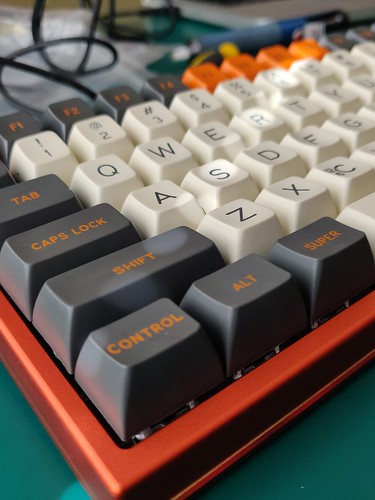
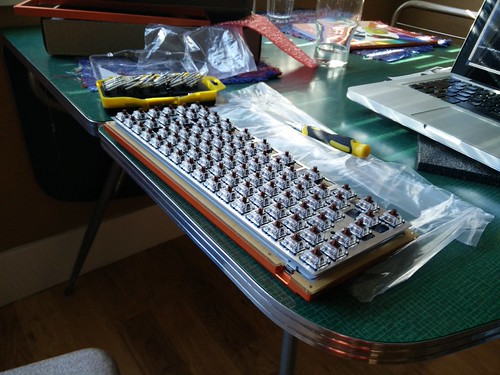
    So, after about two years I’ve finally built my keyboard. By which I mean, from a pile of keys and a circuit board and a case, and some keycaps I’ve assembled it.

    Photo

    It’s not quite my dad’s first keyboard which he wirewrapped and built by hand. But it’s nice to type on something that I know is mine. It’s a bit more clattery than the mac’s keyboard – I could get some little rings to stop the clatter, but it makes me feel quite…nostalgic.

    It’s still missing…err… 6 keycaps. That’s because when I ordered the keycaps I wasn’t 100% sure what layout I wanted. When I did decide it was too late to order the rest (because it was a massdrop run). I’m waiting (optimistically) for them to do another run – because I really like the look of the keyboard, but I’ve got two keytops with the wrong slope (Page Up / Page Down) and I’ve had to use blanks for Control / Alt / Cmd on the bottom row because I wanted a different size than is in my keycap set.

    It does feel nice though. Now we just need to finish the house and then I’ll build the desktop that’s going to replace my aged (10 year old) laptop (which today let out a confusing and unpleasant wailing noise). And hopefully that’ll have the dual benefit of having a machine with a bit of umph, and also having getting me to stop dinking quite so much.

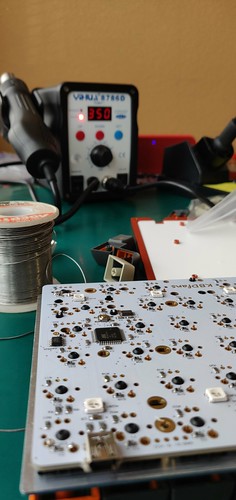
    It’s been nice though – I broke out my Solder / SMD rework station (unnecessary, really, but it’s the only USian soldering iron I have).

    IMG_20180725_145355

    I’m also working on upgrading the media server to a new harddisk and a new OS. Because that’s a relaxing thing to do the day after my colonoscopy*.

    Anyhow, I should get back to it… and tidy up the 800 boxes I’ve got out to make today happen so far.

    * Benign polyps, they think. But it left me with a need to be near a loo today. Which I’m thankful that I realised before I left for the house for the day.

  • House Maths

    So, we’re moving the fuse box electrical panel (and replacing the shonky crappy old panel. I’ve spent this morning sat working through this document that allows you to check the rating required for your service. I’d been thinking we might need to go up to a 300A supply, but it seems like 200A should be fine, which is pleasing. This is probably because the stove appears to be a fan-gas oven, which confuses the pants off me.

    So the electrical loads that would normally be consumed by cooking stuff have disappeared into the gas. Which helps.

    The sums work out at 96A which seems low to me, but that’s what the maths says. And I guess we normally charge at night when other loads tend not to be in use, so it probably works out fine.

    I’ve also been trying to do load balancing. This whole 110v m’larkey makes wiring waaaay more complex.

    UK: Incoming power -> RCDs -> Bunch of ring mains (lights, sockets, some single runs to specific appliances). Bob’s your uncle.
    US: Incoming power -> Breakers of lots of different flavours -> Many spurs that all have to be balanced so that each of the two (120v) legs of the 240v gets roughly the same current draw + 240v loads that pull off both. You may be able to get an uncle called Robertish if you’re lucky.

    So that means sitting down and trying to work out what groups of sockets and appliances are ‘likely’ to be on at the same time and then trying to organise them. Without just generating a billion different circuits. Then add in my desire to keep lighting and electrical outlets mainly on separate breakers (not required, but preferable). Then add in code requirements for specific areas to have specific kinds of breakers, or the dishwasher to have it’s own separate circuit… which it probably needs anyway in terms of power demands, but still…

    …gah.

    Of course this might all be punishment for the pre-regulation the-entire-kitchen-converges-on-one-socket design that I left in place in the first house I worked on in Bristol. I didn’t *make* it that way, but I didn’t fix it either. Just shoved all the wires back in the back of the socket and said “yeah, that’ll work”. I suspect it got fearsomely hot if you ran the washer/dryer and the oven at the same time.

    Anyhow, since I’m not going to be doing that again and this is to be better planned, then I’ve spent some time on it. Hopefully it will work as recent calculations mean that I think I’m wiring the panel and just getting someone else to do the actual moving of the service / installation of the weatherhead… Technically, we could do that too, but I value my hands and my life :)

    At any rate, I’m planning to submit the permit today – if we get the Rav back in time (it’s getting a new driver’s door lock, the old one having died).

    —-

    In other house news, the smell of urine seems to be decreasing. We’ve removed the chipboard that covered the lounge, the hall, the kitchen and one bedroom. All that’s left is a bit of chipboard under the kitchen unit that we’ve not yet removed, the back bedroom and a small front cupboard. Spraying near a full bottle of urine odour remover onto the worst staining and the front step – along with a moderate amount of vinegar – seems to have helped too. I can now go in the house without wanting to run even when the windows have been closed. It just smells of musty old house and crawlspace.

    Hopefully when we put down the vapour barrierey underlaymenty stuff that will resolve it completely. Although we’re planning to replace some of the worst car decking with new – and there’s one section which has broken.I’m guessing it’s rotted away under the end of the bath… but when I was lifting the chipboard I levered against it and it descended rather than the chipboard (with tile) coming up.

    Pics on flickr as usual.

    —-

    And in other, other news, I fell for a scam.

    It took about a minute for me to twig and undo it, I think. About half a second for me to go “oh, you fucking idiot” and then the rest of that minute in a panicked google search and settings adjustment.

    I listed our Insight on Craigslist, then got a message from someone saying they were interested, and could they call. Then I got a message saying that I needed to enter a two digit authentication code to speak to the craigslist person. I was somewhat suspicious – but after the person had tried a couple of times and I’d got messages each time I thought “well, what could I lose – I’m giving them information they’re giving me”. Apparently – this is a means of getting access to your phone number because when I entered it I got a Google Voice message – and allowing them to use it.

    Thankfully, the answer is here. So within about half a minute I’d reclaimed my lost number. I’m hoping that the dickhead who did it didn’t manage to do anything useful with it.

    After about 15 calls from the irritant, (s)he seems to have stopped. But it’s just f’kin annoying. I also am feeling a bit pissy because the Honda Forum seemed to think that the price was reasonable for the car, but now it’s been on there for a week I’ve had nary a bite. This may mean that all my sums about us replacing the car with an EV have to be reworked. If we have to drop the price of Insight to sell it…

    Feh.

    —-

    And in other, other news, I realised I should have ordered a smaller shift key when I ordered the keys for my keyboard. I did a test assembly of the kit which went fine, but I’ve not soldered it yet because I need the key tops to ensure that the layout I’m planning will work with the keys I’ve bought. It’s still very pretty though. It shall be super pretty when it arrives.

    IMG_20170926_163714

    I just need to etch the CTL logo into it.

    CTL terminal (in very fetching orange and black)

    I just wish I could get an orange fabric covered curly keyboard cable to use. They don’t seem to exist :(

  • Tales of the Pinebook and Linux fun

    So, I’ve continued to work on making the pinebook a comfortable usable device. It’s been a bit of battle – my mail server has some quirks to the way it’s set up which meant that it took me quite a while to get it working. I’m still having issues with another mail server I use, where I’m not sure if it’s me or the server. My lovely friend, who’s the Admin, has sent me some stuff, and I’ve sent her some stuff, so hopefully I can get it worked out.

    I ended up doing my first build-from-source in quite a while today, so I could have Sylpheed, which is (apparently) a nice lightweight mail client. Certainly it seems pretty good. Can’t work out how to force it to allow certificate.

    It’s fascinating (and at times a little frustrating) using the pinebook, because some stuff clearly taxes the hell out of the processor. I rarely log onto Facebook, but wanted to to grab something today and wow does that suck.

    Still, it’s demonstrated some things for me – like the fact that my Linux server is set up right, it’s my Macbook that’s being a dick about connecting to it. I don’t know why – but the SMB share will only connect as a guest, not as a user. It fails to authenticate if you try and log in as an actual user. I’ve not yet had a good look as to why though – but since the Pinebook just happily connects (when I give it the username and password) then I”m going to point my finger at the Macbook.

    And yeah, otherwise it’s a handy laptop that I can drag around and not worry too much about. And while Linux on ARM has proven to still be a bit of a pain in the arse (e.g. Telegram, which I’d like to run, is only available compiled for x86 Linux). It’s superlight and the battery life isn’t bad either.

    It’s also finally nudged me into upgrading logitech media server on the media server, which, after the last upgrade had developed an irritating bug where when you added tracks to the playlist, or even just pressed play, it tended to make the squeezebox crash after a few seconds. Loading the web interface also seemed to take an age, too. I’d not got around to nosing at that problem, but it turns out that there was an update to the update which seems to have fixed it.

    So yay.

  • Danger, Will Robinson!

    Danger, Will Robinson!

    I have fallen into the dangerous territory of the mechanical keyboard. See, many years ago I had a rather nice IBM keyboard which died. I can’t remember how it died. It probably got run over by a steamroller, or somesuch (I think it got knocked off a desk and landed key side down on the prongy-footy-bit of a wheelie chair).

    At any rate, I loved it, but eventually it made my poor hands hurt when I was doing technical writing. Also, I tried taking it to my office and had to bring it home to prevent my summary execution for the clickety-clackety-noise of it distressing and distracting my colleagues. Anyhow, so first I discovered tenkeyless keyboards, which are nice. Especially if you have a dinky little numpad to go with it that can float off and be moved around as needed.

    Mhm.

    Then I discovered pretty keycaps.

    And while I knew that mechanical keyboards were “a thing”, I’d not really realised the extent of “the thing” that they are. And I can feel myself being sucked into it. Mainly because I thought “oh hey, wouldn’t it be fun* to build my keyboard myself”. Why I thought this is probably related to my dad, who had to build every damn bit of the computer himself, and made a rather fine hardboard cased lilac coloured keyboard. And I am always rather sad that I got rid of that in one of the tidies. I mean, it wasn’t useful or anything, because it was a terminal keyboard for a terminal he built, which I no longer have either.

    But I rather liked it.

    And then I saw the T0mb3ry SA Carbon keycap set. And I spent far too much money on it. Which is silly, and I couldn’t work out why I liked it so much.

    Then it came to me. It reminds me of the old CTL / ITL keyboards my dad used to bring home (scrap ones). I was aware that it kinda reminded me of early 80’s computers, but it’s that whole orange/black bone/black combo that makes me think of the Modular One system. I’m not sure if those keyboards came from Modular Ones, or if they were from some other CTL / ITL machine.

    So that explains that.

    So anyhow, I’ve ordered the keycaps, because I’m weak and they’re pretty, and I’ve also started to nose around for a mechanical key tester (one with a USB connector so that they can actually serve a purpose as a num pad later), and then I’ll need to work out if I really want to fork out the cash for a keyboard kit, or whether just buying a keyboard and slapping the keycaps on will do me.


  • In the years before…

    …when the internet was young[1] I used to collect the odd video. You’d find some bizarre things out there. They’d be uploaded in all their 320×240 glory, usually in mpeg or flv format… It’s not a massive collection, and mainly these things can now be streamed on youtube in vastly higher quality. But I have discovered since resurrecting my media server that something is f’ked up in the flv player on our media player. The speed is hideously variable. It actually makes me feel quite nauseous to listen to any of them. I’ve also got some videos that were sent to me by a nice person who worked at a record label – when they were being sold / closed.

    Ugh.

    In other related news, as you might gather the server is up and working. The files are mainly where they belong. Some stuff seems to have disappeared and will need to be reripped :(

    I want to add some stuff for privacy purposes… I’m gradually trying to move towards behaving like the privacy aware citizen I am, but having installed a VPN I found I couldn’t get either Plex or Subsonic working. Trying to persuade port-forwarding to work with a VPN is quite challenging. I’m aware this would reduce the security of the connection, but… I am trying to hit a nice point between security and insanity.

    [1] well, ish.

  • Just a little bit…

    Because Linux’s move command is actually copy-then-delete if it’s not within one partition, I have to do this file shuffling in multiple chunks. Which means selecting a group of files, saying “move them”, waiting an hour while it does that, then selecting more files and doing it again. It seems to be working, so far, and I’ve done a teeeensy bit of tidying of the files on the way past (I really need to either sit down and suck-up tidying up this server, or obtain a minion to do it for me. Given the latter’s beyond unlikely, I think the former will have to occur at some point).

    What I really need to do is borrow a few 4Tb drives, shuffle everything onto there, then set up a nice raid array, and shuffle it all back. It’s 11Tb worth of data (well, about 10Tb plus a 1Tb install disk, which is, yes, a ridiculous install disk, but it was a data disk until it got ‘too small to be useful’). But I don’t really have the cash to throw at a new multidisk array. Not if I want to get an EV to relieve my poor Minor of it’s 60 mile commute each work day. I don’t mind taking her some of the time, but I don’t really want to destroy her. So I think, for the time being, we’ll just have to put up with things being the way they are. Mind you, at least they’re now in a case where the disks are all in proper bays. That’s quite exciting. And I can take disks out without disassembling the entire PC.

    Still as I watch file 481 of 1,702 move from one directory to another at a whopping 52Mb/sec (the other board was faster, when it worked, it used to hit about 80Mb/sec – then die), I can’t help but think of the fantastic musical treat that popped into my head as I considered that I had to move the files just a bit at a time.

    Sorry.

  • So far, today has gone better

    I spent this morning watching Big Clive tearing down a cheap USB charger which, for unfortunate part-failure reasons – passed mains straight through to the USB port. Sadly for the makers, who actually seem to have given a fig about design – and who’ve actually gone to more trouble than seems common to build a reasonable piece of kit, they were let down by a parts failure.

    Anyhow, the thing is gently soothing to me, reminding me of sitting reading while my dad would strip down and repair electronics.

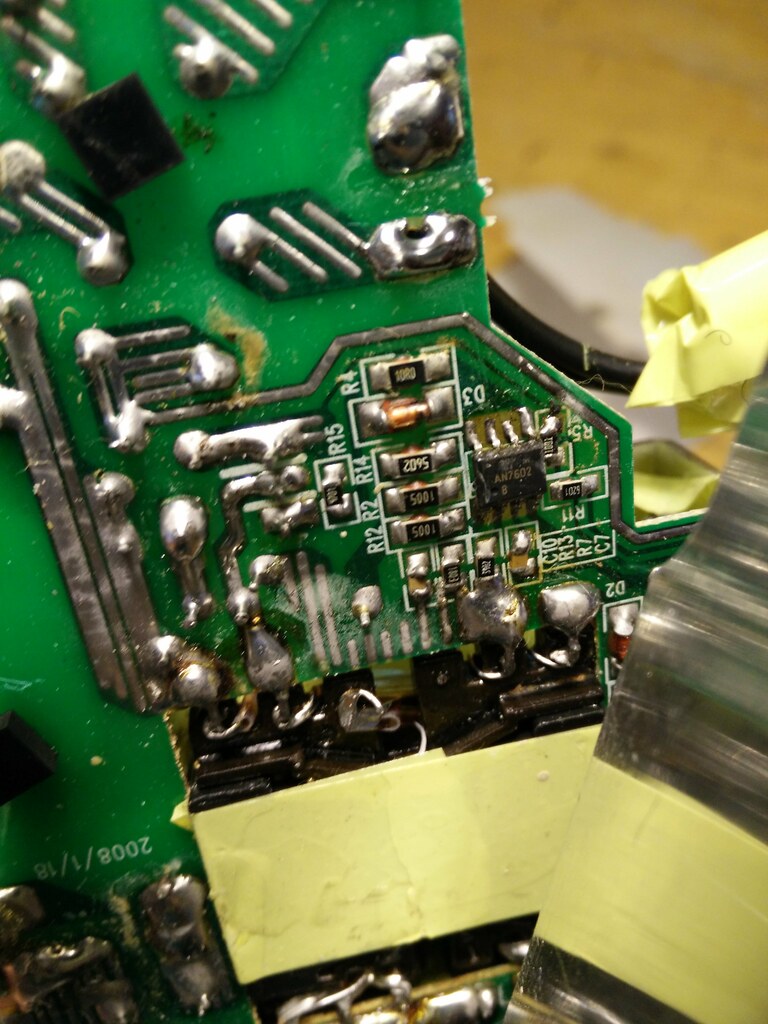
    So it finally got me motivated to try and move the cable from the knock-off apple supply (which said “MagSafe” but actually appears to provide the full 85W regardless of whether it’s connected or not) to the old apple one I had which had a faulty cable. I’ve got an array of toys here now, most importantly in this case my temperature controlled iron which was complete overkill (and proved I need a different tip for it – so I’ve added some new tips to the selection of stuff that I’ve got in my AliExpress cart…for later).

    Anyhow. The general impression when I stripped the knock-off one down was that it was poorly made:

    IMG_20160412_134512

    Although I didn’t get in to actually looking at the design. After a fair chunk of time and a bit of a battle I managed to desolder the apple cable and replaced it with the one from the knock-off – which seems to be working nicely. The poor apple brick is now held together with tape tho’.

    I also trekked out to return the case I bought from Blinq – they turned out to be very nice people, giving me a chunk of refund for the massively delayed motherboard delivery – and promising to refund the money from the case that was smashed in transit.

    Also, the nice guy at the FedEx place taped the box shut for me, when I asked about tape :)

    Then I headed over to what has become my favourite computer store and started peering at cases – explained my predicament (i.e. it normally lives out of sight, so I want something that’s functional, has lots of bays, and is also fairly cheap) – and they produced a second hand case for $45. Bargainateous, if you ask me.

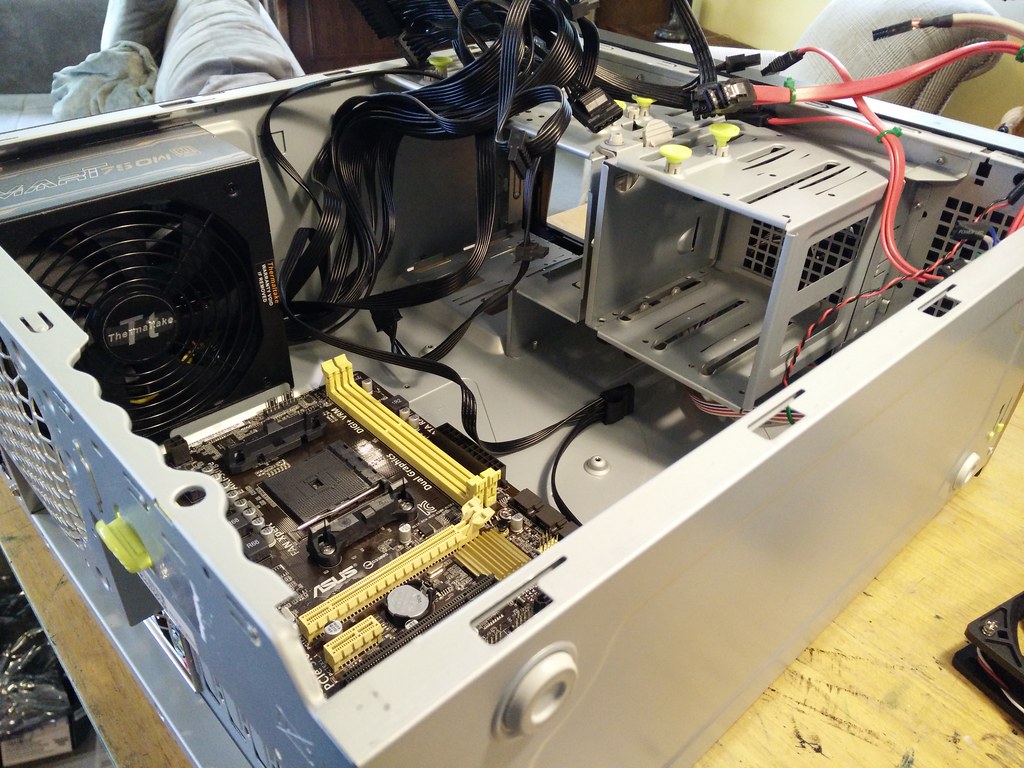
    Having got home I commenced the joyous task of rebuilding my PC using a new motherboard but the same everything else – not really an upgrade, more a side-grade.

    IMG_20160412_123438

    Once thrown into the new case, it booted straight up and seems, surprisingly, pretty happy. I’ve now started trying to sort out the pigging mess the file systems had become – with the spurious resetting problem seemingly better (it just moved 160 Gig of files in one go, and before that another 90 Gig), it’s looking like it might be possible to at least get it working and the files back where they belong. Once that’s done I can start contemplating the possibility of sorting out a raid array for it.

  • Creeping Americanism

    So, my card holder finally no longer contains my British bank cards. They’re now securely & safely stored away… I’ve not quite had the heart to remove some of the loyalty cards from the independent retailers in Bristol. But the transition plods on.

    I more or less remember to say pants at work, and ask them to get up on the gurney (although gurney still sounds odd coming from my mouth). I still fuck-up though and say plaster, not band-aid, which confuses the hell out of people. And I continue have no clue about degrees Fahrenheit. Thankfully, most of the thermometers at work will do the conversion for me when patients ask (and we work in Centigrade anyhow).

    I can say gas station without feeling too silly, although in my head it’s still a petrol station. At some point I’ll switch and it’ll no longer feel unnatural.

    I’ve finally got around to contributing to saving an NPR station (KPLU), and I think I may finally have managed to waterproof the front of the minor against the PNW’s weather (no guarantees yet, but it wasn’t wet after two heavy storms). All gradual signs of settling, I suppose.

    On the topic of the Minor, the back is proving a little difficult to sort as it turns out most of the reason it’s had water in there isn’t that it’s been running down through the many small holes I’ve been sealing. Or at least, some of the reason is that. Some is that the trunk lid (no, that still feels wrong, the boot lid) actually fits pretty terribly. It’s a glassfibre replacement for the original – I went with glass fibre because the metal ones rust through due to a fabulous water trap.

    Issigonis was good at many things, and apparently designing mud and water-traps in his cars was something he excelled at.

    Anyhow, I remember when it was installed Jonathon commented that the first one was a terrible, terrible fit, so they sent it back and got a replacement that was merely a bad fit. It looks fine until you get close in and then realise that the panelgaps are all wrong, and from the underside you can see a gap through into the boot (trunk).

    Added to which, the seal – which is held on with glue – is peeling off. So I need to find me some impact adhesive and see if I can sort that out.

    Also, when we get back into dry weather I need to see if the vinyl repair kit will repair the tear in the front seat. Although I might want to do that when Kathryn’s here, because she’s much better at mixing paint colours, and I need to get a match for the blue of the seat from the selection of not-matching colours provided.

    In other news, I gave in and ordered a new motherboard. After a full 4 hours of attempting to get around the fact that my motherboard is buggered, I admitted defeat. Every time you try and move a large quantity of data it falls over in a heap. I considered finding the code for my single byte-at-a-time read-write routine from the RiscPC (which was painfully slow, but did something handy at the time), then realised that I was clearly insane. All the disks report good health (although I’ve had very sick drives report everything is dandy). It does it whether or not you’re using the graphical system (which seemed to make the problem worse at first, but actually seems not to after more playing).

    I worked out eventually that the reason it was going quite so spare was that I’ve moved a bunch of files around and both Plex, Logitech’s media manager and Subsonic were all simultaneously attempting to catalogue the roughly 8-9 terabytes of data.

    I did pay for the speedy 3 day delivery of the motherboard…which I’m peeved at myself about because I’m not going to be around to install it until next week anyhow. I should have thought about that more. I was previously peeved at myself for forgetting to pay for the extra fast delivery on the case…before realising that I should be grateful that I forgot!

    Now we get the excitement of seeing if Linux will nicely handle the sudden change in all the underlying hardware, or if I get to play ‘lets install everything again’, which is a fun game for one (annoyed) player. It almost invariably boots when I do shit like this, but usually there’s some problem that persistently rears its head and causes me to end up renewing the installation.

    My main hope is that I can, at least, get away without buying any new hard disks for the moment. I mean, really that’s the bit I’d like to upgrade. I’d like a nice Raid 6 array, but it’s tricky to do so as things stand, because pretty much all the disks are full. And a complete state. Although it might be a possibility with careful shuffling. Hrm. Also; would involve expanding the partition after the installation. I forsee many complications… but it’s worthy of more contemplation. Might have to spend a moment looking at the state of the disks and then playing with them before I get into reinstalling.

    Anyhow. House wise we’re still flailing around hopelessly. We look at places, debate whether they’re too far to really be liveable, fail to make any decision on where we’d want to start a business, and basically are having a bit of a crisis of ‘too many big decisions and not knowing what to do’. We’ll get over it, but it may take a little bit.