Category: Writing

  • Persuading Scrivener (3.5.1) to use your folder names as chapter titles

    Because I’m either insane or a masochist, having got Scrivener working yesterday I decided I was going to import my document from word and then attempt to produce an epub. Since that’s essentially what Scrivener is for me, a glorified epub/book pdf producer, since they don’t support Linux properly, and also don’t support Android – and I do all my writing on those two OS’s.

    OTOH, there’s a dearth of ‘cuddly’ Linux tools to produce decent epubs and PDFs for printing, so… here we are.

    If you’re actually writing in Scrivener, this next bit you might want to skip.


    Now, before we get into this properly, I also should say my “import docx” process also was a pain in the arse. Despite the document having separate sections defined for each chapter, and each chapter having a heading, e.g. Chapter 1 – It’s Definitely Just a Game, it singularly failed to correctly divvy that up into chapters. What I ended up doing was running through that document and throwing a # in front of every chapter title and using the “import and split” function, but rather than use the default “Split using document’s outline structure”:
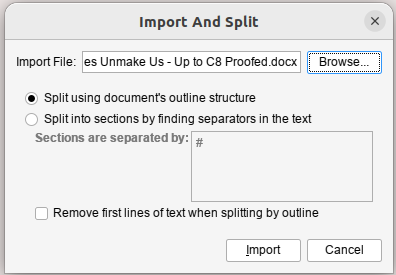
    Scrivener Import and Split window

    I selected “Split into sections by finding separators in the text”. The only problem with this is that for some reason it also picked up, seemingly only at the end of each chapter, the page number and included that in the text. So every chapter ended “Page nn”. I just fixed that by hand.

    Anyway, if you’ve actually written your document in Scrivener, that’s all kinda moot.


    Oookay.

    The recommended way to set up your books (although Scrivener are very much “you can do it how you like”) seems to be to have a folder for each chapter and then each scene in a separate Text. In my case because I imported a giant 120k word document, each chapter is one scene because I can’t be arsed to separate them.

    So you end up with something that looks a bit like this:
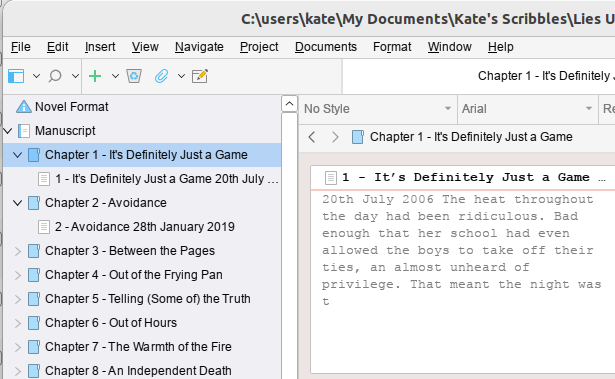
    Scrivener Main Window

    Now again, mine’s kinda funky because of the way I imported it. And my problem was that in my Text for each chapter, I had the chapter number and the title for the chapter and the subheadingy bit where I have the date (fractured timeline story, it hops about a lot). And what I wanted to do was have the chapter number and title as part of the Chapter Title, and then have the subheading-date as the Section Title.

    The solution to this would seem to be obvious. Change the Folder Name to the Chapter Title (in my case I just cut/pasted the Chapter Number and Title, but actually I’d probably suggest not doing it that way, and just putting the Title; y’know, in case you want to reorganise things in the future. I mean, my book is done apart from proofreading, so…hopefully it should now be fairly static).

    But then the epub that came out was…wrong. And finding the answer to “I would like my Folder names to be used as Chapter Names” turned out to involve a lot of wading through self righteous people explaining how you should read the manual and it’s all clear after that (it isn’t). And a lot of unanswered questions on multiple forums.

    So.

    The thing you need is indeed in the Compile Dialog. When you first open it it’ll probably look kinda like this – well, if you select “Compile for epub…” in the drop down menu at the top of the window:
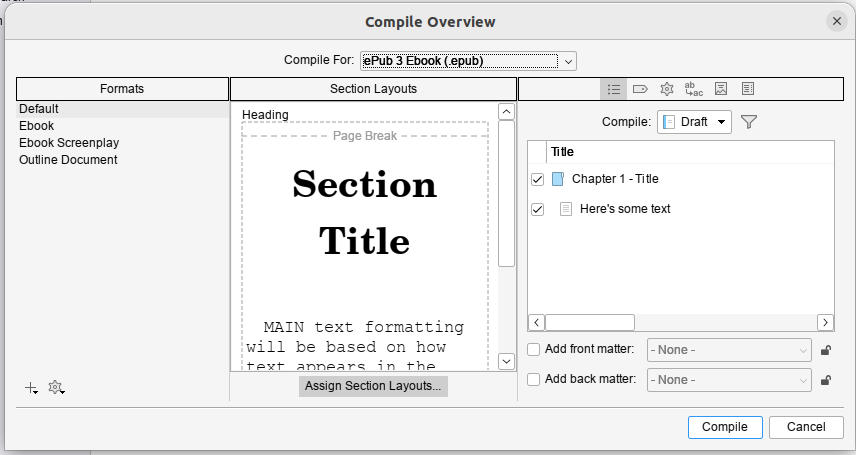
    Scrivener Compile Dialog

    Now I’m going to recommend you go with this plan, so you don’t fuck up the original version, although it’s a bit more involved.


    But before we do that, when you click on ebook, if you get this error:
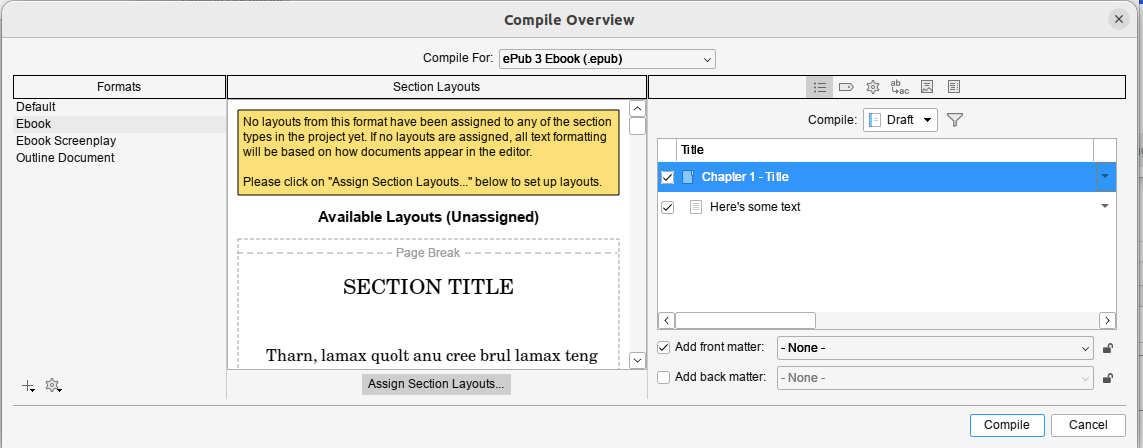
    Scrivener window with error

    Then you’ll need to cancel out of this dialog and go fix the assigned structure of your book. By default Scrivener sets this to “Structure Based” which I don’t yet know how it’s meant to work, but I can tell you it didn’t work for me.

    I had to go set all the folders to Chapter Heading but got away with leaving the individual Texts as Structure Based. If you collapse the tree so all you can see is the folders you can multiselect (Click on the first one and Shift-Click on the last one) and then right click and set them all in one go).

    By the way, a reminder, this is really me flying blind and throwing things at the wall until they stick. This worked for me, eventually.
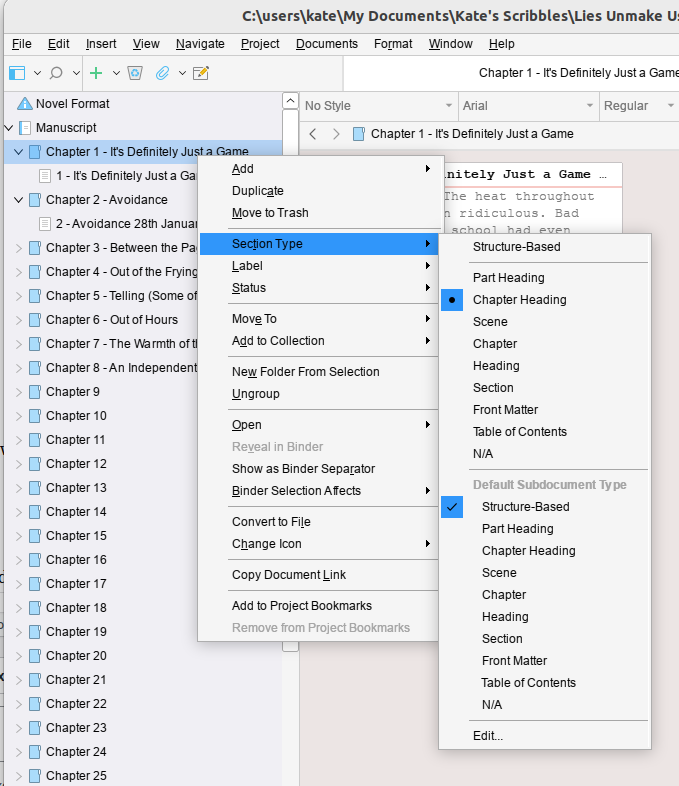
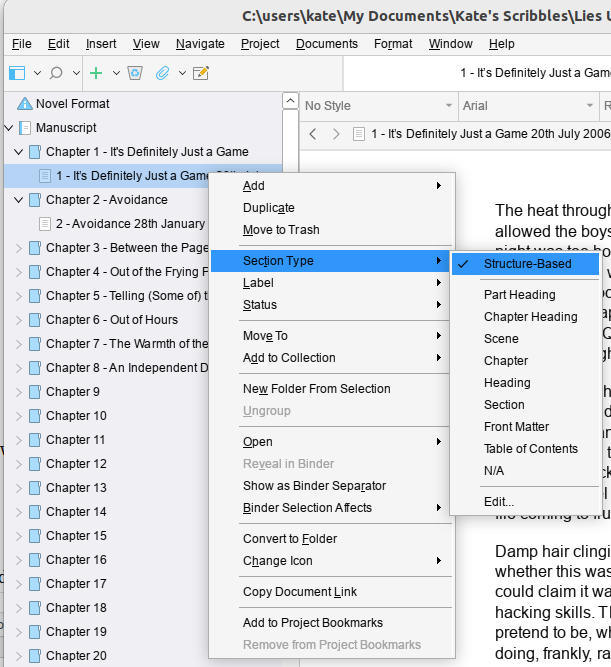


    Okay, so back you go to that Compile window and select ebook. Then in one of the Section layouts (the middle section of the window), click on the little grey edity pen icon that appears when you hover around the corners of the example layouts.

    Then, for the sake of your sanity, click “Duplicate Format & Edit Layout”; I called mine “Ebook Titles from Folders” because I’m deeply imaginative.
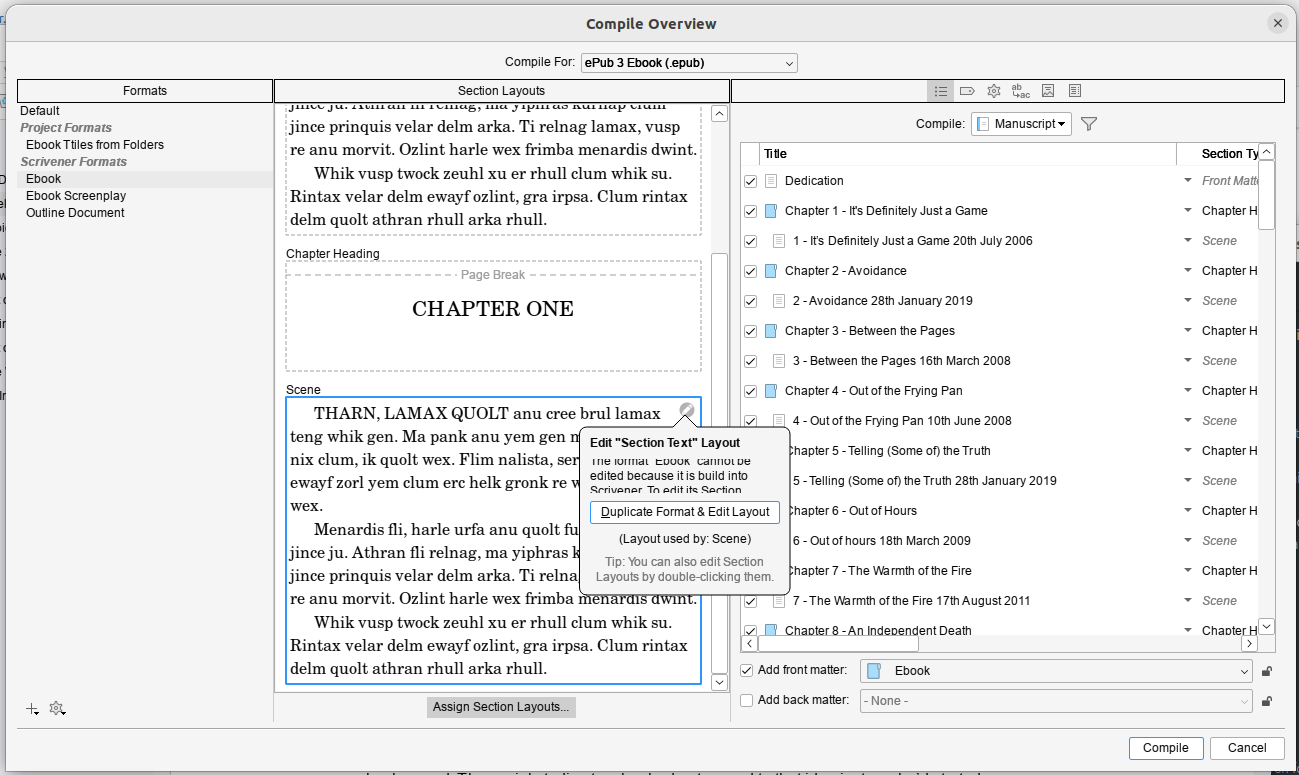
    Compile dialog from Scrivener with Duplicate Format and Edit Selected clickedOnce that’s done you need the little grey button at the center bottom of the Compile window: Assign Section Layouts…
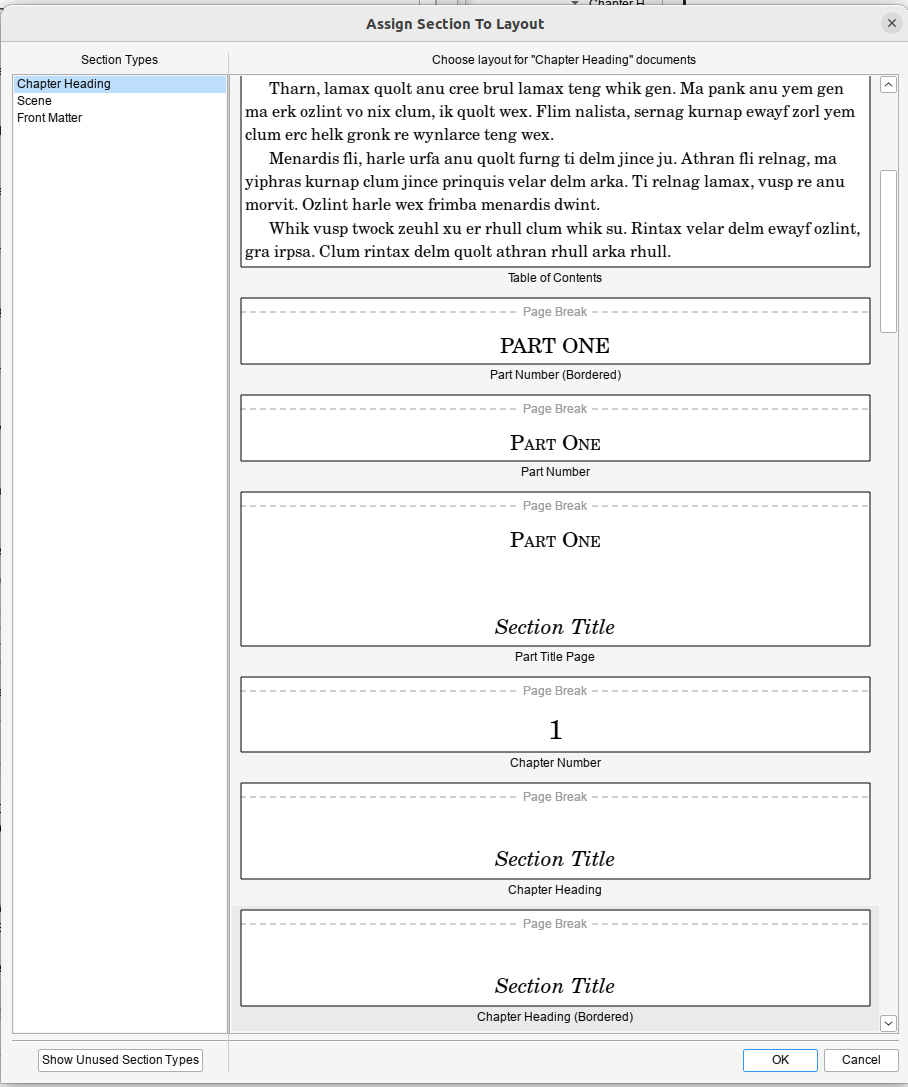
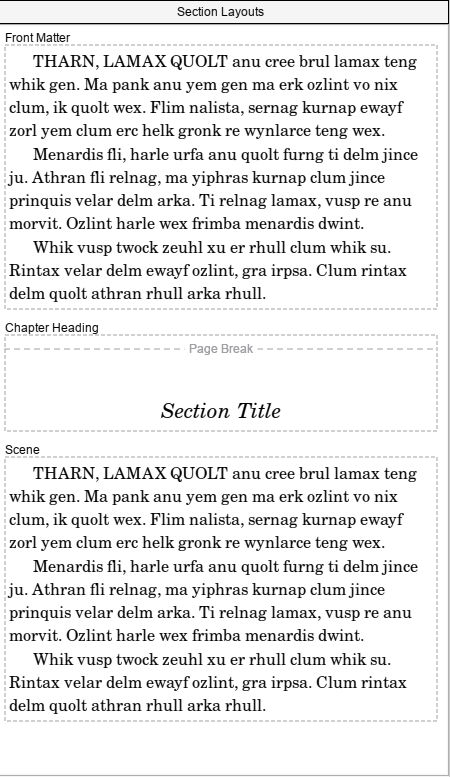
    Scrivener Assign Section LayoutsAnd then you need to assign a layout to each of the Section Types in the left hand pane. This is where it gets tricky, because I didn’t really understand what the examples were showing and it doesn’t provide a live example to show you based on how you’ve set things up. But my current understanding is that if you want your Folder Titles to be your chapter headings, you need to use Section Title. You can choose if you want a page break, or a border, or what have you. If you were wise enough not to hand-edit-in your chapter numbers, you might want a version that automatically inserts chapter numbers *and* a Section title, if that’s a thing you want.

    I ended up selecting Section Text for both Front Matter and Scene, and a Bordered Chapter Heading with Section Title for the contents for Chapter Heading:
    Section Layouts

    Obviously, if you want Back Matter, then you’ll also need to set that up. Since this was a ‘quick test’ I was doing to check that epub worked I’d thrown together a quick cover and used that.

    Anyhow, once you’ve done that, you can hit compile and you should end up with your folder titles as the chapter title…
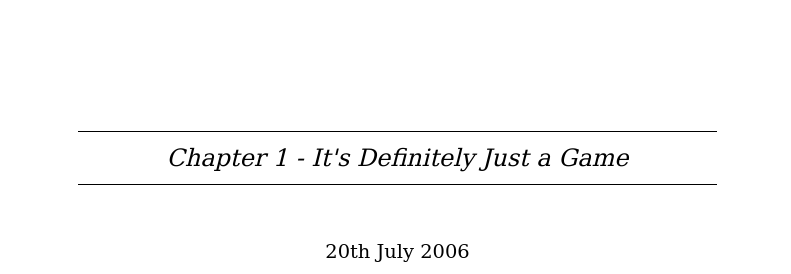
    And thank fuck that’s done.

  • Scrivener 3.5.1 on Ubuntu Linux 22.04

    Scrivener seems like the best available option for epub production on Linux, so I decided to install it… There is a linked guide in the Scrivener forums (here) on which this is based, but Scrivener crashed twice during setup following it – several of the dialog boxes behaved very oddly – and when I got to the end of it I was presented with a black window that would, after a minute or so quit without doing anything. It took a bit of hunting around to work out why, and so here’s my version with the fixes I did.

    So, I’m going to basically nick the nice guide’s commands (because last time I didn’t do that, the guides then disappeared) – I’m not going to bother explaining the nice way the original author did, because you can read his nice post. He also has screenshots, because he’s a fancy duck. I’m not going to do that or install a VM to recreate the experience (because honestly, I can’t be bothered). Oh, and this is assuming you have an x86 based linux box*.

    I have presented this in more or less the order I did it – which is not the most efficient way to do this. I’ve tweaked it very slightly to avoid you running into Scrivener crashing during setup problem, but it’s pretty clear that you could fix skip installing the old version of Wine and hop straight to the new one. But since I didn’t test that I’m not going to put that as a “this works” set of instructions.

    Oh, and you’re gonna need a terminal window and some comfort with typing in commands.

    1. Download Scrivener for Windows 64 bit version (3.5.1 is the version I have working).

    Okay, fire up your terminal window and go to town:

    1. Enable i386 architecture

      sudo dpkg --add-architecture i386

    2. Update your sources

      sudo apt-get update

    3. Install Wine and some other dependencies

      sudo apt-get install winetricks wine64 wine32:i386 winbind -y


    Okay… now here’s where I’m going to recommend that you do things slightly differently than I did. Because here I proceeded to “Installing Scrivener” and then ran into problems. I’m not willing uninstall it to test the theory that this order works better, nor do I want to spend the time to create a VM to test this theory. But I present to you the two options:

    • Following the semi-official instructions, go through the flaky – crashes multiple times – setup which worked for me after doing steps 5-7 to fix its not-working state. If you wanna do that, do steps 8-11 and then come back and do 5-7 if it doesn’t work.

    Or

    • Do these steps 5-6 first, then install Scrivener. This should skip the crashing during setup issues I had, and the well this doesn’t work disappointment of the official instructions. I have not tested this option, but it’s what I’d do knowing what I do now. YMMV.

    1. Upgrade Wine – Wine in the Ubuntu repositories is ooold, and a more modern version seems to be required for Scrivener to work now. This requires a few steps:
      • Install more required packages to allow WineHQ’s own version to install. You could probably merge this with step 4.

        sudo apt install dirmngr ca-certificates software-properties-common apt-transport-https curl -y

      • Add the WineHQ repository to your list of approved places to get software from

        curl -s https://dl.winehq.org/wine-builds/winehq.key | sudo gpg --dearmor | sudo tee /usr/share/keyrings/winehq.gpg > /dev/null

      • Import that repository that you just added

        echo deb [signed-by=/usr/share/keyrings/winehq.gpg] http://dl.winehq.org/wine-builds/ubuntu/ jammy main | sudo tee /etc/apt/sources.list.d/winehq.list

      • Update your sources

        sudo apt-get update

      • Install the new shiny version of Wine over the top of your archaic one

        sudo apt install winehq-stable --install-recommends

      • You can check this worked with the command

        wine --version

        Which on my system today says Wine 9.0

    2. Upgrade Winetricks

      sudo winetricks --self-update

    3. Now while Scrivener will/should work on Windows 7, which is how Wine likes to present itself by default, it works better on Windows 10. It also requires dotnet to activate the licence, apparently. I’m still using the test version. BTW, Firing off this command will present you with a bunch of Windows installs to run through and should tell wine to identify itself as Windows 10.

      winetricks --force corefonts win10 dotnet48

    Okay. Now you’ve put in all the prerequisites, you can install and setting up Scrivener:

    1. Run the Scrivener installer in Wine – Ryan recommends moving the default install location to C:/Scrivener for ease of use. And don’t let it install desktop icons (they won’t work).

      wine ~/Downloads/Scrivener-installer.exe

    2. Delete Scrivener’s own Text to speech. It’s broken and causes the application to hang in Wine.

      cd ~/.wine/drive_c/scrivener

      rm -rf texttospeech/

    3. Create a script in your home directory to fire up Scrivener so you don’t have to type out the long command each time (Ryan recommends using vi. I’m not going to do that to you; if you’re happy using vi go ahead, but it’s not exactly friendly to people who might be at the level of needing this guide).

      cd ~

      nano scriv.sh

      • Type this into the first line in your nice empty text file:

        cd ~/.wine/drive_c/scrivener && /usr/bin/wine Scrivener.exe

      • Hit [Ctrl+O] to save
      • Hit [Ctril+X] to exit
    4. Make your shiny new script executable (a thing you can run as a program)

      chmod 0700 scriv.sh

    Now from your command line if you type ./scriv.sh you should have Scrivener working.

    Feel free to tell me if you don’t. Don’t expect me to fix it…

    * If you don’t know what x86 means, as long as it’s a ‘proper laptop’ and doesn’t have an apple logo on it you’re probably fine. If you’re trying to do this on a repurposed chromebook, ???? ????? (?Allah yahfazak). Theoretically, I think you could get this working on an ARM/apple silicon based linux box using QEMU. When my MNT Pocket Reform arrives I may do that, just for shits and giggles. If I do I’m sure I’ll do another high quality guide like this.

  • Non FFS Stuff

    Just before I disappear to bed I want to make a little note. Today I put in a request to a beta reader – because I’ve done the first pass edit on my book. I’ve had a huge row with imposter syndrome all day, but at the end of the day I’ve written a roughly 115k word novel. That’s what it is. I wrote a novel.

    It’s uneven, for sure. It’s a first draft and it needs work. I think it starts pretty well, gets a little *meh* in the middle, then has a stronger final third. I’m a bit thinking the ending is a bit abrupt, maybe it needs more fleshing out? But also…the ending is what it is because of the nature of events. But maybe the epilogue needs a little more. So.

    Yeah, so I’m at the “I need feedback from someone who’s not me” stage.

    And also, I need a break from it because I’ve been staring at it for more than a decade.

    And maybe it’s shit.

    And maybe it’s not.

    But at the end of the day I’d like to make it into something not shit, and something worth reading, and I think it’s not irredeemably terrible so I’m gonna try and do that.

  • Concept, briefly stated

    Scene: London street, small deal table with well dressed chap performing the shell game (three card monte with cups) but the patter is based around ‘finding/watching the benefits scrounger’ represented by a small statuette under the cup.

    Entranced crowd watching and betting (and losing).

    The camera pulls back and slowly reveals, sliding in and through the crowd a variety of well dressed bankers, politicians, business men are picking the pockets of everyone there.

    ….

    End.

    Creative Commons License
    This work is licensed under a Creative Commons Attribution 4.0 International License.

  • Part 2 – edited

    Comments / Typos welcome.

    Kathryn’s been very sweet and advised me that my suspected tendancy to over-write comes out quite strongly, uh, when I write. I’m attempting to turn it down a little. I’ve trimmed this a bit, and I’ll try to trim and edit it based on people’s comments…

    ——
    The room was bathed in the neon glow of the alarm clock. The blinds kept out what little early morning sun was around, leaving the blinking digits to illuminate the cluttered interior and, under the duvet, the lurking figure of a boy.

    The radio crackled into life (it was cheap, and crackled into most things), bringing news of a traffic jam on the Westway, again. Not that it mattered; he lived well outside London, but it made him feel part something bigger than his small suburban existence. Not that that mattered anyway; all of the events being earnestly reported were currently falling on the ears of someone deeply asleep. His head buried in the feathers of the pillow, his mind elusively detached.

    But slowly, The Clash being broadcast from the little white box dragged him into the land of the living. Well, in a limited way. The actual, perhaps unintended result was that he attempted to burrow deeper into the pillow, making himself one with the mattress. Perhaps, just perhaps, if he thought hard enough about it the day would go away and leave him in peace.

    The radio didn’t stop playing though, at least not by itself. After a few minutes a wiry hand crept out from under the duvet and felt it’s way across the bedside table. Hunting along the row of buttons it found ‘Snooze’ before making it’s way back under the duvet. Unfortunately for the boy, the ‘Snooze’ function failed to stop the sun continuing to rise, and the sunlight began to filter through the trees, then the blinds, and finally he could ignore it no more and as the radio crackled into life again bringing forth ‘I Believe’ he crawled from the bed.

    Pausing only for a somewhat theatrical switching off of the radio he went, cursing en-route, to find his dressing gown.

    “How do you get from London Calling to bloody I Believe in 10 minutes?” he muttered to the room.

    Staring at the disorganised clutter he awaited some kind of response.

    “No, bloody thought not” he mumbled.

    “Kim! Are you up yet?”
    “I’m getting there.” he shouted back.
    “Getting there? Are you actually out of the bed?”
    “Of course I am mum!”

    He could here the mutterings about the inappropriateness of the ‘of course’, but decided that discretion was probably the better part of valour and made his way into the bathroom. One brief shower later he was fishing in his battered wardrobe for a school uniform. ‘One more year’ he thought to himself. Then he’d be able to wear whatever he wanted; well, sort of, to school.

    And then she crept into his consciousness. Would she be there today? Sometimes she was there, at school, and sometimes not. No one ever seemed to comment on it. At least, not where he’d overheard them. Not being Mr Popular meant he kind of lacked on the gossip front, only catching what was said loudly enough for him to overhear. Being almost invisible, at school at least, helped on that front. Not that he normally cared for such conversations, but since her occasional appearances – and the slightly odd fact that her name was only ever called at register when she was there, he’d become more interested conversations to which he’d normally not be a part.

    “Bye Kim. Have a good day at scho..” he heard his mum disappearing out the front door.

    By the time he grabbed his coat he heard his mum’s fiat pulling away. He cursed again – he’d missed his lift to school, again.

    “Ah well, better late than never”

    He chanted his teacher’s favoured comment on his late arrival – then he considered other clichés he could use for his arrival, grabbed his Walkman, and stomped down stairs. At least he’d get breakfast. He’d probably get some kind of warning at school, but so long as he made his first class they’d not care. Mind you, he thought, one of these days if he was early he might see her arrive. He looked at his watch.

    Not today though. Today he’d be lucky to make registration, and he’d only make that if he didn’t eat. He perched on the stool and poured out Cornflakes. Breakfast first, then school.

  • Pretentious? Moi?

    I know I’m not the greatest writer in the world, but I’m debating carrying on with this. Sort of. In a way.

    —-

    Outside the stars glint appealingly, calling her to come out again. She’s done it before many times, and she slips quietly from under the covers. Her family are well used to her nocturnal nature but even years on don’t know what she does when they’ve gone to sleep. She dresses quietly, picking her clothing in the half light of the moon, it doesn’t matter anyhow, at this hour there’ll be no one there. No one but her; exploring alone.

    She knew what clothes she was going to wear anyway. Stuffed down at the back, behind everything else, she selects her favourites. Carefully stepping over the crease in the carpet marking the fractured floorboard that hits some pipe or other waking the house, she descends the stairs. Counting each one quietly, stepping with care, and listening for the breathing of her parents. Any change and she pauses. Waiting for it to settle again before placing her foot gently on the next stair.

    She’s been here so many times, she skips the steps that creak and stands, quietly, in the darkness of the hall. Her next challenge is one of the harder ones. Extracting her bunch of keys, the ones that will allow her to reenter this world, from the pile of keys on the shelf. Her family aren’t the neatest, and her keys occupy the lowest space in a pile of discarded metalwork. Fingers carefully working she moves each bunch; her Mum’s car keys, her Dad’s office keys, her Mum’s locker key. Finally the light catches the edge of the lettering on her door key, she slips them into her hand, listens once again, before stealing for the kitchen door.

    She wonders who thought that sliding doors were a good idea, and she attempts to hold the door mid point between the scraping bottom guide and the squealing top casters; moving it slowly and carefully she is able to peer through the kitchen window. The street is jaundiced by the glow of sodium vapour, but no houses glow anaemically from the opposite side of the street. She slips out, her key holding the lock open until the door is quietly shut, and as she finally releases the key she feels the release of the outside world.

    The girl steps out onto the street, still carefully checking, but at this time no-one arrives, and she is free to slip through the world unnoticed. She wanders suburbia, quietly taking in all that surrounds her. Her runners crunch across the gravel, the silence briefly broken but returning and washing over her. This, she thinks is freedom. But it is, as always, short lived. After an hour or two the cold of the night eats through her clothing and she slips back home.

    A repeat performance takes her quietly up the dark stairs, praying internally that no-one will awake – there would be too much to explain. Eventually she wraps herself in her duvet, the warmth seeping through her and drifts to sleep.