Category: Creative

  • Loan label for Welcome to Dorley Hall

    I threw together a loan label for my loan copy of Welcome to Dorley Hall, the phenomenal book by Alyson Greaves (it must be good because I don’t have ‘loan copies’ of any other books).

    It’s all made with free SVGs.

    I’m releasing it under CC-BY-SA 4.0

    The following are the sources / licences for this:

    The crown: Source | Licence

    The lion dormant: Source | Licence

    The deer rampant – modified (broken antler): Source | Licence: Non-commerical personal use only

  • Persuading Scrivener (3.5.1) to use your folder names as chapter titles

    Because I’m either insane or a masochist, having got Scrivener working yesterday I decided I was going to import my document from word and then attempt to produce an epub. Since that’s essentially what Scrivener is for me, a glorified epub/book pdf producer, since they don’t support Linux properly, and also don’t support Android – and I do all my writing on those two OS’s.

    OTOH, there’s a dearth of ‘cuddly’ Linux tools to produce decent epubs and PDFs for printing, so… here we are.

    If you’re actually writing in Scrivener, this next bit you might want to skip.


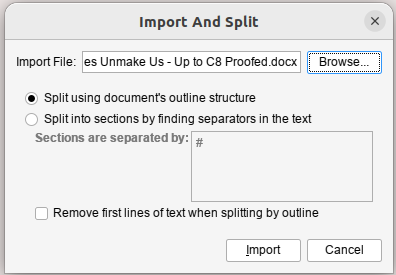
    Now, before we get into this properly, I also should say my “import docx” process also was a pain in the arse. Despite the document having separate sections defined for each chapter, and each chapter having a heading, e.g. Chapter 1 – It’s Definitely Just a Game, it singularly failed to correctly divvy that up into chapters. What I ended up doing was running through that document and throwing a # in front of every chapter title and using the “import and split” function, but rather than use the default “Split using document’s outline structure”:

    Scrivener Import and Split window

    I selected “Split into sections by finding separators in the text”. The only problem with this is that for some reason it also picked up, seemingly only at the end of each chapter, the page number and included that in the text. So every chapter ended “Page nn”. I just fixed that by hand.

    Anyway, if you’ve actually written your document in Scrivener, that’s all kinda moot.


    Oookay.

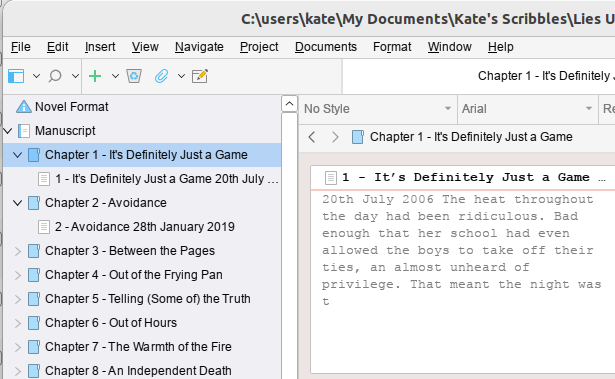
    The recommended way to set up your books (although Scrivener are very much “you can do it how you like”) seems to be to have a folder for each chapter and then each scene in a separate Text. In my case because I imported a giant 120k word document, each chapter is one scene because I can’t be arsed to separate them.

    So you end up with something that looks a bit like this:

    Scrivener Main Window

    Now again, mine’s kinda funky because of the way I imported it. And my problem was that in my Text for each chapter, I had the chapter number and the title for the chapter and the subheadingy bit where I have the date (fractured timeline story, it hops about a lot). And what I wanted to do was have the chapter number and title as part of the Chapter Title, and then have the subheading-date as the Section Title.

    The solution to this would seem to be obvious. Change the Folder Name to the Chapter Title (in my case I just cut/pasted the Chapter Number and Title, but actually I’d probably suggest not doing it that way, and just putting the Title; y’know, in case you want to reorganise things in the future. I mean, my book is done apart from proofreading, so…hopefully it should now be fairly static).

    But then the epub that came out was…wrong. And finding the answer to “I would like my Folder names to be used as Chapter Names” turned out to involve a lot of wading through self righteous people explaining how you should read the manual and it’s all clear after that (it isn’t). And a lot of unanswered questions on multiple forums.

    So.

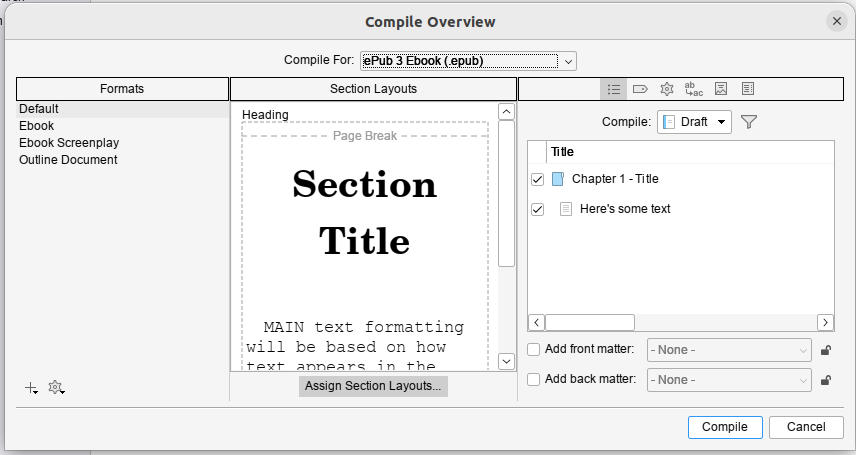
    The thing you need is indeed in the Compile Dialog. When you first open it it’ll probably look kinda like this – well, if you select “Compile for epub…” in the drop down menu at the top of the window:

    Scrivener Compile Dialog

    Now I’m going to recommend you go with this plan, so you don’t fuck up the original version, although it’s a bit more involved.


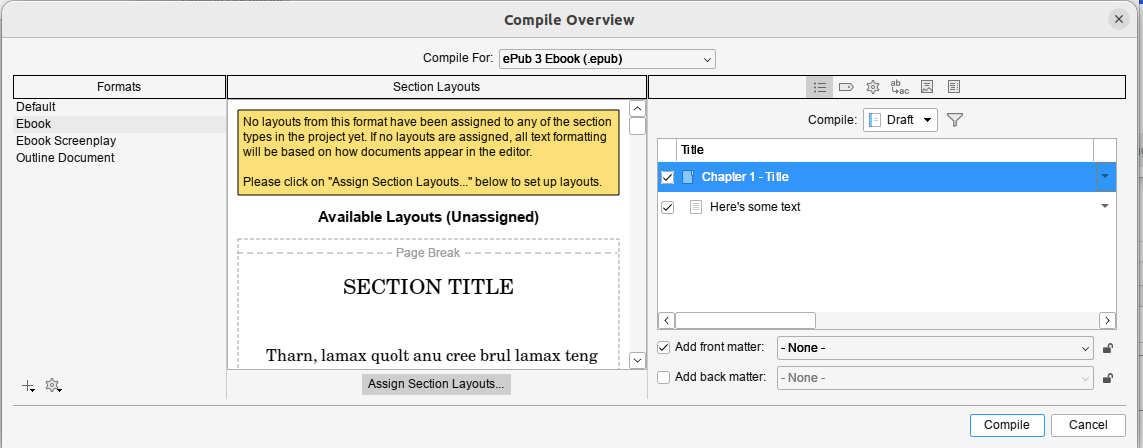
    But before we do that, when you click on ebook, if you get this error:

    Scrivener window with error

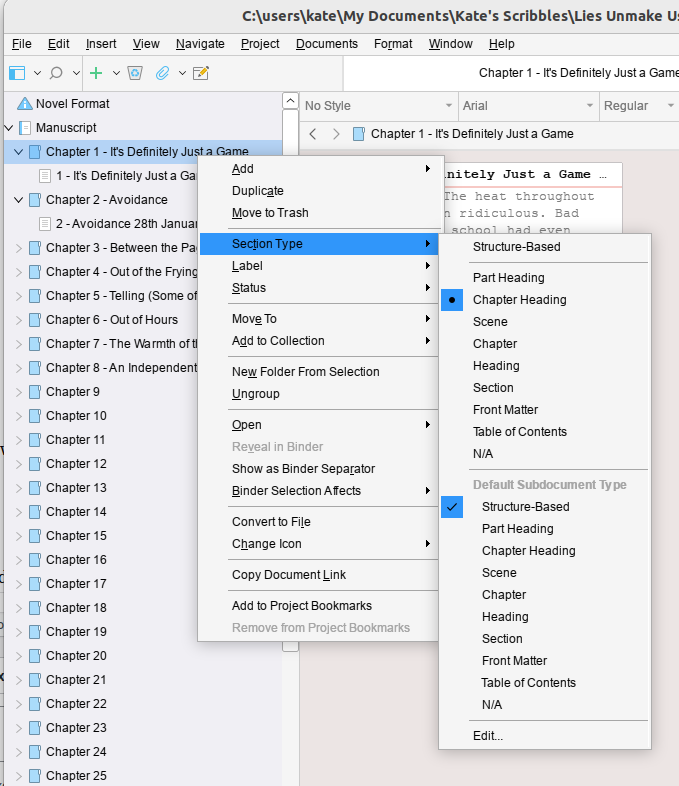
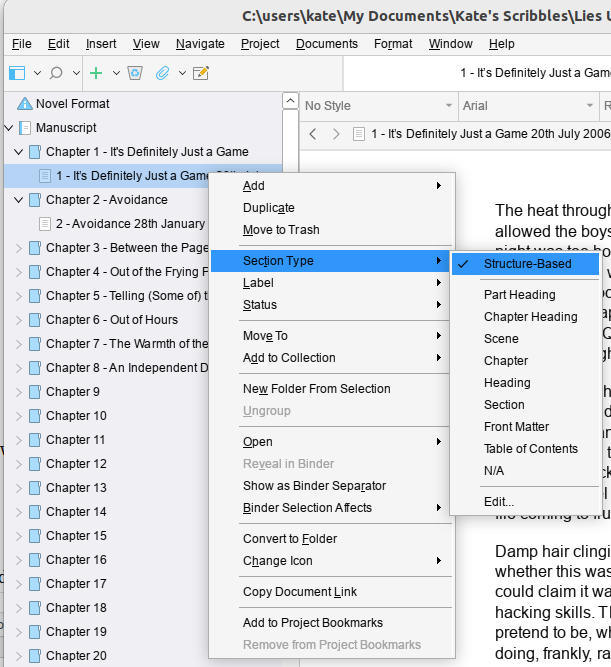
    Then you’ll need to cancel out of this dialog and go fix the assigned structure of your book. By default Scrivener sets this to “Structure Based” which I don’t yet know how it’s meant to work, but I can tell you it didn’t work for me.

    I had to go set all the folders to Chapter Heading but got away with leaving the individual Texts as Structure Based. If you collapse the tree so all you can see is the folders you can multiselect (Click on the first one and Shift-Click on the last one) and then right click and set them all in one go).

    By the way, a reminder, this is really me flying blind and throwing things at the wall until they stick. This worked for me, eventually.


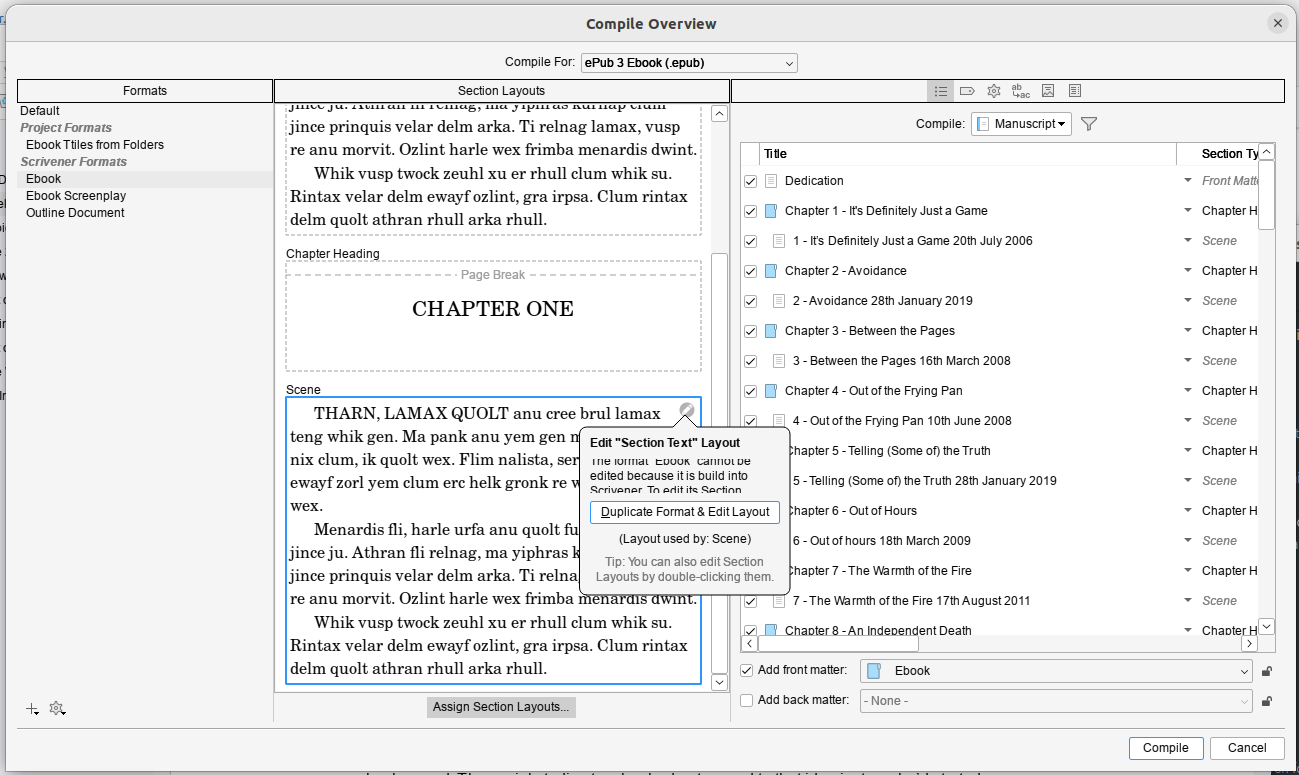
    Okay, so back you go to that Compile window and select ebook. Then in one of the Section layouts (the middle section of the window), click on the little grey edity pen icon that appears when you hover around the corners of the example layouts.

    Then, for the sake of your sanity, click “Duplicate Format & Edit Layout”; I called mine “Ebook Titles from Folders” because I’m deeply imaginative.

    Compile dialog from Scrivener with Duplicate Format and Edit Selected clickedOnce that’s done you need the little grey button at the center bottom of the Compile window: Assign Section Layouts…

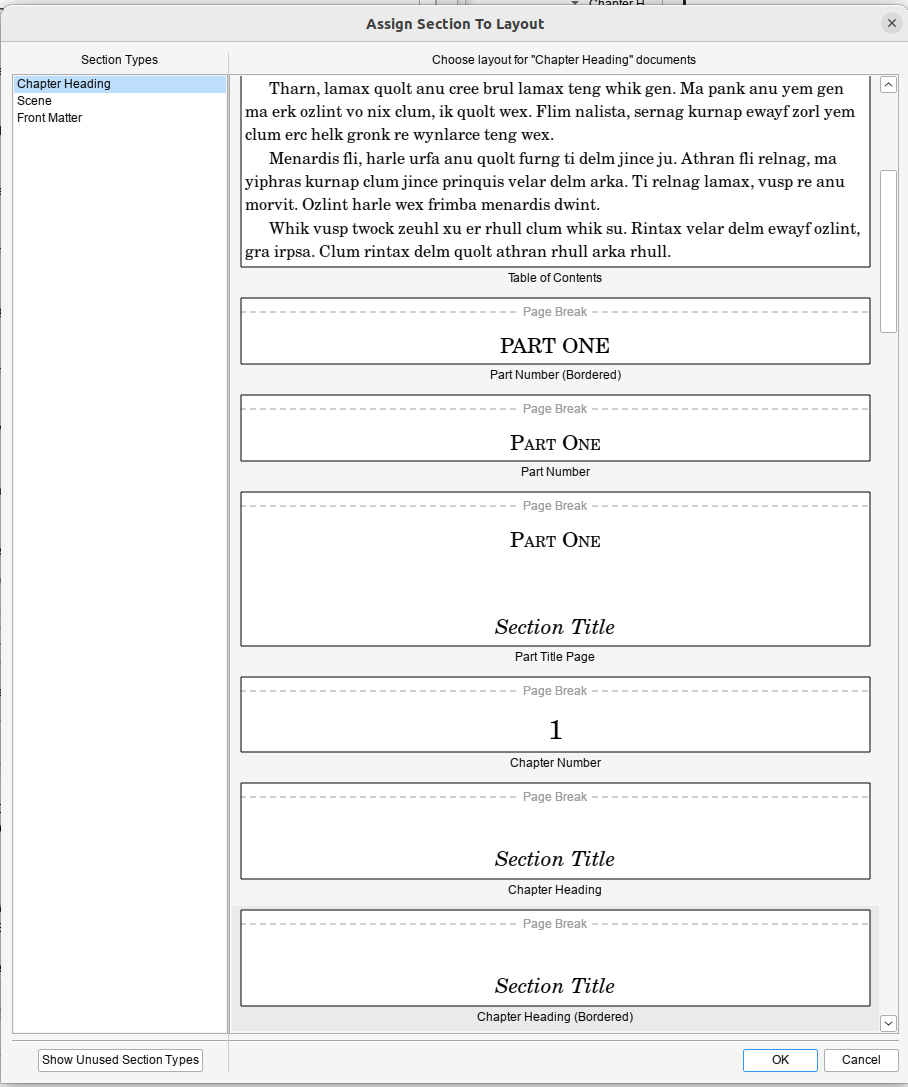
    Scrivener Assign Section LayoutsAnd then you need to assign a layout to each of the Section Types in the left hand pane. This is where it gets tricky, because I didn’t really understand what the examples were showing and it doesn’t provide a live example to show you based on how you’ve set things up. But my current understanding is that if you want your Folder Titles to be your chapter headings, you need to use Section Title. You can choose if you want a page break, or a border, or what have you. If you were wise enough not to hand-edit-in your chapter numbers, you might want a version that automatically inserts chapter numbers *and* a Section title, if that’s a thing you want.

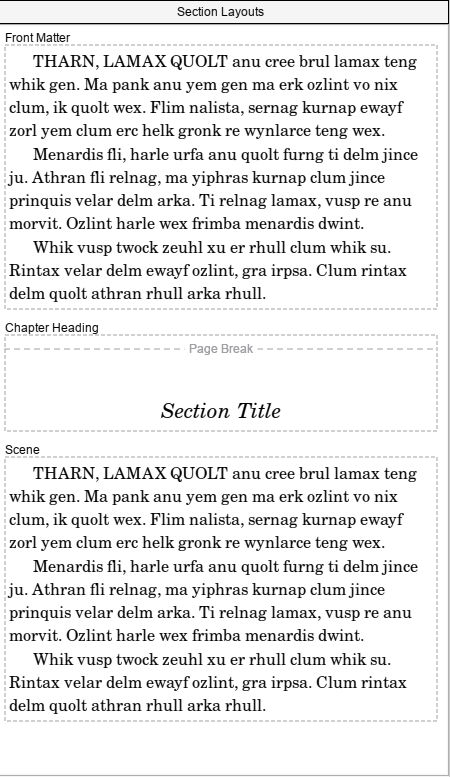
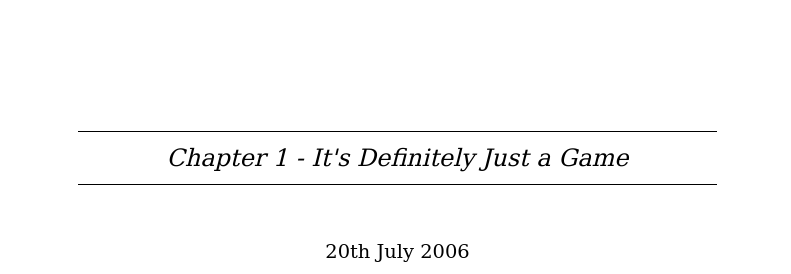
    I ended up selecting Section Text for both Front Matter and Scene, and a Bordered Chapter Heading with Section Title for the contents for Chapter Heading:

    Section Layouts

    Obviously, if you want Back Matter, then you’ll also need to set that up. Since this was a ‘quick test’ I was doing to check that epub worked I’d thrown together a quick cover and used that.

    Anyhow, once you’ve done that, you can hit compile and you should end up with your folder titles as the chapter title…
    And thank fuck that’s done.

  • Scrivener 3.5.1 on Ubuntu Linux 22.04

    Scrivener seems like the best available option for epub production on Linux, so I decided to install it… There is a linked guide in the Scrivener forums (here) on which this is based, but Scrivener crashed twice during setup following it – several of the dialog boxes behaved very oddly – and when I got to the end of it I was presented with a black window that would, after a minute or so quit without doing anything. It took a bit of hunting around to work out why, and so here’s my version with the fixes I did.

    So, I’m going to basically nick the nice guide’s commands (because last time I didn’t do that, the guides then disappeared) – I’m not going to bother explaining the nice way the original author did, because you can read his nice post. He also has screenshots, because he’s a fancy duck. I’m not going to do that or install a VM to recreate the experience (because honestly, I can’t be bothered). Oh, and this is assuming you have an x86 based linux box*.

    I have presented this in more or less the order I did it – which is not the most efficient way to do this. I’ve tweaked it very slightly to avoid you running into Scrivener crashing during setup problem, but it’s pretty clear that you could fix skip installing the old version of Wine and hop straight to the new one. But since I didn’t test that I’m not going to put that as a “this works” set of instructions.

    Oh, and you’re gonna need a terminal window and some comfort with typing in commands.

    1. Download Scrivener for Windows 64 bit version (3.5.1 is the version I have working).

    Okay, fire up your terminal window and go to town:

    1. Enable i386 architecture

      sudo dpkg --add-architecture i386

    2. Update your sources

      sudo apt-get update

    3. Install Wine and some other dependencies

      sudo apt-get install winetricks wine64 wine32:i386 winbind -y


    Okay… now here’s where I’m going to recommend that you do things slightly differently than I did. Because here I proceeded to “Installing Scrivener” and then ran into problems. I’m not willing uninstall it to test the theory that this order works better, nor do I want to spend the time to create a VM to test this theory. But I present to you the two options:

    • Following the semi-official instructions, go through the flaky – crashes multiple times – setup which worked for me after doing steps 5-7 to fix its not-working state. If you wanna do that, do steps 8-11 and then come back and do 5-7 if it doesn’t work.

    Or

    • Do these steps 5-6 first, then install Scrivener. This should skip the crashing during setup issues I had, and the well this doesn’t work disappointment of the official instructions. I have not tested this option, but it’s what I’d do knowing what I do now. YMMV.

    1. Upgrade Wine – Wine in the Ubuntu repositories is ooold, and a more modern version seems to be required for Scrivener to work now. This requires a few steps:
      • Install more required packages to allow WineHQ’s own version to install. You could probably merge this with step 4.

        sudo apt install dirmngr ca-certificates software-properties-common apt-transport-https curl -y

      • Add the WineHQ repository to your list of approved places to get software from

        curl -s https://dl.winehq.org/wine-builds/winehq.key | sudo gpg --dearmor | sudo tee /usr/share/keyrings/winehq.gpg > /dev/null

      • Import that repository that you just added

        echo deb [signed-by=/usr/share/keyrings/winehq.gpg] http://dl.winehq.org/wine-builds/ubuntu/ jammy main | sudo tee /etc/apt/sources.list.d/winehq.list

      • Update your sources

        sudo apt-get update

      • Install the new shiny version of Wine over the top of your archaic one

        sudo apt install winehq-stable --install-recommends

      • You can check this worked with the command

        wine --version

        Which on my system today says Wine 9.0

    2. Upgrade Winetricks

      sudo winetricks --self-update

    3. Now while Scrivener will/should work on Windows 7, which is how Wine likes to present itself by default, it works better on Windows 10. It also requires dotnet to activate the licence, apparently. I’m still using the test version. BTW, Firing off this command will present you with a bunch of Windows installs to run through and should tell wine to identify itself as Windows 10.

      winetricks --force corefonts win10 dotnet48

    Okay. Now you’ve put in all the prerequisites, you can install and setting up Scrivener:

    1. Run the Scrivener installer in Wine – Ryan recommends moving the default install location to C:/Scrivener for ease of use. And don’t let it install desktop icons (they won’t work).

      wine ~/Downloads/Scrivener-installer.exe

    2. Delete Scrivener’s own Text to speech. It’s broken and causes the application to hang in Wine.

      cd ~/.wine/drive_c/scrivener

      rm -rf texttospeech/

    3. Create a script in your home directory to fire up Scrivener so you don’t have to type out the long command each time (Ryan recommends using vi. I’m not going to do that to you; if you’re happy using vi go ahead, but it’s not exactly friendly to people who might be at the level of needing this guide).

      cd ~

      nano scriv.sh

      • Type this into the first line in your nice empty text file:

        cd ~/.wine/drive_c/scrivener && /usr/bin/wine Scrivener.exe

      • Hit [Ctrl+O] to save
      • Hit [Ctril+X] to exit
    4. Make your shiny new script executable (a thing you can run as a program)

      chmod 0700 scriv.sh

    Now from your command line if you type ./scriv.sh you should have Scrivener working.

    Feel free to tell me if you don’t. Don’t expect me to fix it…

    * If you don’t know what x86 means, as long as it’s a ‘proper laptop’ and doesn’t have an apple logo on it you’re probably fine. If you’re trying to do this on a repurposed chromebook, ???? ????? (?Allah yahfazak). Theoretically, I think you could get this working on an ARM/apple silicon based linux box using QEMU. When my MNT Pocket Reform arrives I may do that, just for shits and giggles. If I do I’m sure I’ll do another high quality guide like this.

  • Non FFS Stuff

    Just before I disappear to bed I want to make a little note. Today I put in a request to a beta reader – because I’ve done the first pass edit on my book. I’ve had a huge row with imposter syndrome all day, but at the end of the day I’ve written a roughly 115k word novel. That’s what it is. I wrote a novel.

    It’s uneven, for sure. It’s a first draft and it needs work. I think it starts pretty well, gets a little *meh* in the middle, then has a stronger final third. I’m a bit thinking the ending is a bit abrupt, maybe it needs more fleshing out? But also…the ending is what it is because of the nature of events. But maybe the epilogue needs a little more. So.

    Yeah, so I’m at the “I need feedback from someone who’s not me” stage.

    And also, I need a break from it because I’ve been staring at it for more than a decade.

    And maybe it’s shit.

    And maybe it’s not.

    But at the end of the day I’d like to make it into something not shit, and something worth reading, and I think it’s not irredeemably terrible so I’m gonna try and do that.

  • Okay, maybe I should do more with it

    So, on my night shifts (last for a good long time, I presume), I re-read my NaNoWriMo chunk – from 2013. It turns out I still don’t hate it, and I’d quite like to know what happens ‘next’. Which makes me think maybe it’s non-awful and potentially worth me fiddling with it some more.

    I mean, there are problems, many and manifold, and there’s some continuity issues. But overall, I quite like it.

    Meh.

  • Oh ah, ugh.

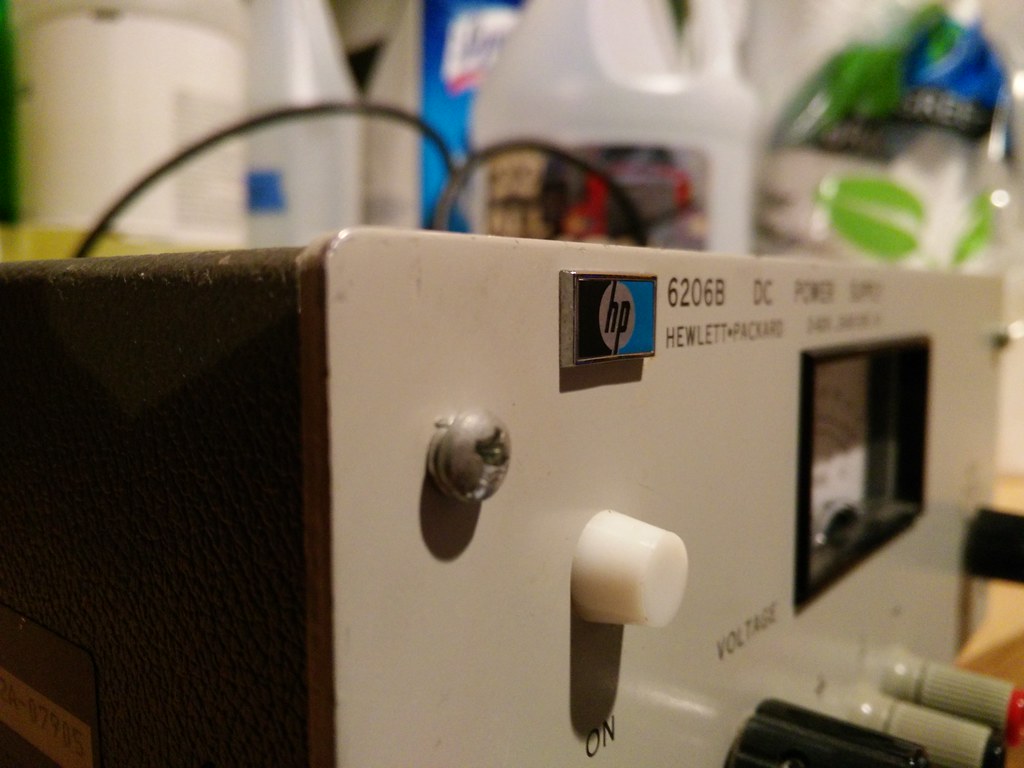
    The first bit of test equipment arrived for the lab.

    IMG_20160317_174356

    I checked it over, and having seen nothing alarming at all (even the capacitors look in good health at the moment), I’ve tried it out. It’s within about 0.4v of what it says on the scale, which is good enough for me at the moment – on the 70V scale – but a bit far out on the 7v scale (assuming my cheap digital multimeter’s giving a fairly accurate reading, which it probably is). I’m having a quick nose at the manual to see how to calibrate it, though, because it’d be nice if on the 7v scale it read a touch more accurately. So that’s all good. Sadly the little orange neon glow I’d expect when I switch it on is lacking, which I’ll have to check out. All in all, it does seem to be working okay. But there’s a bit of a problem.

    I can smell it.

    Despite the fact it looks clean, remarkably so, and indeed the interior boards are amazingly dust free, it absolutely, positively reaks. It honks. It smells damn funky. Dear god, it smells like someone used it as their smoking room.

    I’ve stripped off and scrubbed the case, then put it in the sun to dry, which made it smell marginally better. I’ve cleaned the interior boards with electronics cleaner. But it still smells. Apparently, there’s naught for it but to sit them out in the fresh air when it’s sunny. And wait. It has, actually, been sunny today. So it spent some time getting a tan on the deck, but until it smells at least a bit better, it has gone back into the garage…

    *shudder*

    Still, I should now be able to at least set up my car’s tracker / alarm so I can install it :)

  • Settle.

    Life continues to be more or less the same as it ever was. I’ve been working, at least intermittently, and I’ve even been paid. That has been rather nice, although it’s led to a bit of a flurry of spending as I’ve taken a bunch of stuff off the ‘want list’ which included several things that I’d decided I wouldn’t buy until we got to the US.

    I’d been holding that restraint for a couple of years. Adding in the last 3 months of me not buying pretty much anything (I bought a few books, and a few items for our business) and then say “look, you’ve been paid”. I snapped. Much of this is ‘fun’ stuff, but the other thing that’s sucked up funds is things like ‘UK to US’ plug adaptors (10 of ’em, on the way). I’d thought I’d replace the old UK plugs with US ones, but bare US plugs are actually ridiculously pricey, so instead I’ve just bought adaptors. From China. Also, bonus, I get to keep the fuses for added safety.

    And BC – Edison Screw lamp adaptors. I was unaware that such things existed – so I’d bought one of the 85-250v LED BC lamps for one of the anglepoises (as a test), but having discovered these I can just go to the store and get what, in the US, are regular LED bulbs and throw those in. Hurrah! These adaptors were way cheaper than the special bulbs and had free postage. Since I’m not in a raring hurry to get the lamps working, that’s fine.

    I also started setting up my ‘home lab’, as it were. Up until now I’ve scrounged stuff from the lovely John, but 4k miles is a little far to take things for testing, and it’s a little tricky to ask John if he’d like to pop over for an evening of tinkering with electronics. I’ve finally got it together and bought a (new) soldering iron / rework gun combo. I wasn’t going to get a rework gun, I mean, me and surface mount are not close friends. But with our business plans, I may want to put together some kind of board with surface mount components, in which case a rework gun will become handy – and it was a few dollars extra to get that functionality. Second hand kit that’s also winging its way to me is a ‘scope that weighs approximately the same as the house (50Mhz Tektronix 453*).

    Die perfekte Welle

    I doubt mine will look 1/10th as nice when it arrives. Indeed, I know some of the plastic knobules from the switches are missing (the selector knobs are all there). I’m hoping (really hoping) that one day my 3D printer will arrive and I can print myself some new ones. If not, I’ve got some sugru in the toolbox.

    I thought about getting something a bit fancier that would be better for digital hardware (perhaps the 150Mhz 454), but if I decide I need that later I can either sell off the Tektronix 453 and get something ‘more modern’, or just suck up the expense if I’ve got attached to the 453. I’ve also got an HP 6200B bench power supply on its way too. John has infested my mind with his HP / Tektronix lovin’, which meant that other, cheaper options got ditched on the way to this selection, but I think they should be handy. And the 453 seems to be considered to be a pretty good scope – which it’s within the realms of my knowledge to repair and keep going.

    Whilst the scope is slightly frivolous at the moment, and is partly a ‘I have little to do at home’ thing some of the kit will be handy straight away. The bench supply will be handy getting the car alarm configured… since it wants to charge a bit before it works, and you need to send it various text messages to get it configured. That bench supply will also be doing duty building up the circuit for the first kit we’re planning for our business.

    Most of this kit is pretty tatty, but should be enough to get me ‘up and running’. At least, once I’ve given it a really, really good clean it should be.

    This splurge of spending does mean that I’m now rather over excited when I see UPS and USPS vans, which tediously never seem to actually stop here…

    Still. I don’t think I can buy much else for the rest of the month (except for needs – like maintaining my poor Minor, that’s had hundreds of miles added some weeks). At any rate, I shall try to exercise restraint. I’ve put a bit into my savings this month and then I’m hoping to put some of the funds we extracted back into the house-savings too.

    At any rate, the rain paused yesterday for long enough for me to go and throw silicone sealant around the minor with reckless abandon.

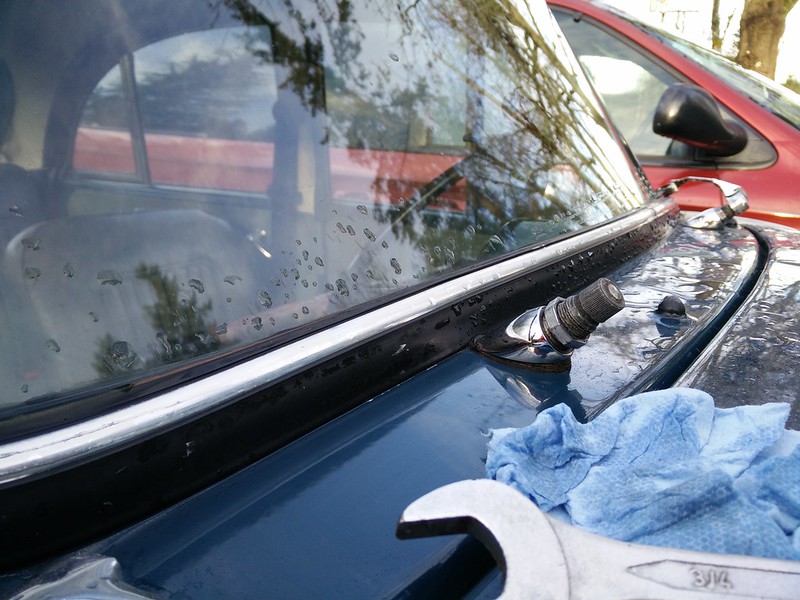
    IMG_20160310_164646

    Water’s been dripping in through that wiper spindle’s hole for a while. In an attempt to prevent it totally destroying the glove box liner, and the radio underneath, and then the floor below that, I whipped off the nut cleaned up the seals and put them back with a thin layer of windscreen silicone on them. I note that this has been done before, with what appears to be gasket sealant. That might have been me… but it didn’t work that time. Here’s hoping this time it does work. Overnight it’s rained and there wasn’t any water that I could feel, so fingers crossed I might get some relief from that.

    I also attacked the boot (trunk) – using sealant around the holes where the “MORRIS 1000” badge is mounted. This morning the boot (trunk) was actually bone dry, which I think is a first, and made me quite happy.

    I also commenced trying to understand how to fit the alarm – and realised that actually, it’d probably make more sense for it to be on our family contract for it’s SMS messaging, rather than me stick it on the Net10 sim I’ve got kicking around. Well, maybe. We need to go and see if we can beg a cellspot for the house as it is slightly ridiculous that you have to go outside to make calls a lot of the time and while we’re there I’ll see if I can add it on at a low rate. Otherwise I’ll see which provider is cheapest for a pure voice/SMS option. It doesn’t need data of any sort, so it’s a big silly getting it a voice/data contract. I also realised that the alarm wants an SD card for some of its more handy features, and it makes sense to fit that before I put the alarm in the car.

    Given that it’s a cheap Chinese system the manual is somewhat challenging to understand at times. Fortunately, it doesn’t seem to require too many features the Minor doesn’t have (indeed, it looks like it should actually be able to track the fuel level of the Minor, which is pretty nifty, though why I’d want to is unclear).

    I thought about fitting it this morning; indeed that was my ‘plan’ for the day. But I am distrustful of the weather, and although it said “0% chance of rain” the forecast started to get a bit sketchy around lunchtime, and it looks like rain every day after now for a while, so getting part-way through is undesirable. I succumbed to my rain-fear and went for a walk instead.

    IMG_20160311_095307

    Which was probably a good plan as it’s been hacking with rain for the last hour and half, and I’d’ve probably still been out there dangling upside-down. I think when I have all the relevant bits, I’ll be a bit more enthused about getting it done.

    In other news, I headed out yesterday to see if I could find a stick blender. We’ve wanted one for a long time, and before I got paid I kept seeing them at goodwill and value village. Of course, now I’ve actually been paid, they’ve vaporised. Goodwill does make me miss the cleanliness of most British charity shops. I’m sure there’s awesome stuff in there, but the electronics sections always make me feel rather like I need to wash my hands thoroughly on leaving. Anyhow, what I did find was ‘Goodwill Outlet’, which is a fearsome place. Unsorted, sad old things piled into plastic waist high bins… It’s the kind of place I feel the need to have a companion, because rifling through the stuff in there by yourself, it feels kinda weird. I suspect that there probably are stick blenders lying prone at the bottom of those bins, but I didn’t quite have the guts to pull so much stuff out.

    And then we come to the elephant in the absent room. The house.

    We’re off looking at properties this weekend. Five of ’em. One with a building, one with a ‘building’ (it’s a house of “poor quality” built in 1901), and 3 bits of land that are just land. I continue to feel the disappointment from the permit-disaster-wetland-hideousness, but hopefully one of these will speak to our souls. One of them, funnily enough, enormously close to where Kathryn’s mom used to live, and would give us effectively the same view. Which is weird. Although the land-with-buildings-on may be better for us, in terms of both location and usefulness. Still, we’ll see what happens.

    * Handily, this is old enough that the entire manual is available here

  • Damn evil technology

    So – years ago I bought a TV capture box. A relatively nice one. A Miglia Evolution TV. All brushed aluminium and shiny. They went bust, and so software support was discontinued with OS X 10.4.

    …which means that for all its shiny shiny, it doesn’t work. At all. Current versions of OS X don’t know how to talk to it and won’t let you even install the drivers.

    Which is upsetting.

    So I bought a cheap USB capture device from t’internet.

    Because, y’see, back in days of yore when this was all fields, and so on, there was an actual incompatibility between videos sold in the US and those sold in the UK. UK VHS videos were PAL – 625 glorious interlaced lines at 25 frames per second, and US ones were a somewhat lower res 525 lines, but a slightly faster frame rate of 30 frames per second.

    Now, in the grand scheme of things, I largely don’t give a monkeys. At this point in history nearly all video cassettes have been consigned to landfill or plastic recycling. However, I’ve four cassettes – and actually a fifth containing a film that shows no signs of coming out on DVD – that I’d like to capture.

    So I found a spare old tape to test it with and after freeing the motors off a little cerchunky-whirry:

    Then I had to find the video cables for it. Because it uses SCART, which is a wildly convenient standard if you’ve got a SCART cable going into another SCART device. Less so if not. But, today I located (in the bucket of wires) my SCART to S-Video adaptor cable.

    Hurrah!

    Only not.

    Because I can’t get the tracking good enough for the crappy cheap USB capture stick. If I plug the video into the telly it’s VHSarrific. A bit wobbly, in the way that VHS sometimes was, but not unwatchably so. And fuzzy, in the way that I’d forgotten how bad VHS was. But otherwise… it works.

    Plug it in to the capture card and it is unwatchable. 2005 Video for Granada TV

    Imagine that high quality image flickering about all over the shop. It’s dreadful.

    Now, the question is, is this something that possibly a better video recorder (like lovely John has) might fix, or is it something that is a sign of such a flawed USB capture stick that it won’t work even then.

    Hopefully we shall find a solution. Not, of course, that I’m sharing this wonderful Promo that Nikki and I made for Granada. Oh no. Although, it’s quite entertainingly bad.

  • Concept, briefly stated

    Scene: London street, small deal table with well dressed chap performing the shell game (three card monte with cups) but the patter is based around ‘finding/watching the benefits scrounger’ represented by a small statuette under the cup.

    Entranced crowd watching and betting (and losing).

    The camera pulls back and slowly reveals, sliding in and through the crowd a variety of well dressed bankers, politicians, business men are picking the pockets of everyone there.

    ….

    End.

    Creative Commons License
    This work is licensed under a Creative Commons Attribution 4.0 International License.

  • Fleshing out the bones

    So, News:

    Untitled

    The Seager Brother’s piano is now in tune. Ish. Close enough for jazz, as they say. Apparently it’s a little flat, but it – our tuner reckons – has always been a little flat. Or at least, sufficiently always as to not be a good idea to change her. And whilst yesterday I said I didn’t recall whether previous tuners had mentioned it (the poor beast was last tuned at least 6 years ago – and by my mum’s piano tuner), I do faintly recall her mentioning it.

    The hammer, which we thought went missing when @aminorjourney was giving it a thorough work out (and was definitely not the first hammer to break in it) apparently didn’t. I thought, honestly was convinced that Nikki and I had checked out all the notes, and that they’d been working. Apparently not. Apparently it went missing at some point before that. At any rate, our illustrious tuner will be returning with a spare hammer and, most excitingly, a music stand. I’ve had this piano about 31 years, and at no point has it had a music stand. It came with the broken remnants of one, and we’d always bull-dog clip the music to it, and when I was practicing longer pieces, my dad would sit next to me to flip the pages (and remind me to actually practice). Eventually, we got my dad’s piano, which was in substantially better condition (but ended up being difficult to make keep tune, because it was wood framed and the wood had dried out), and ‘my’ piano went to live in the garage*. It’s been submerged in 3 foot of water (the flood waters reached approximately a metre deep in my mum’s house, which would have been lapping at the base of the keyboard), ferried around in the back of a transit having been (wo)man handled into the back of a truck off a forklift. If you can abuse it in some way, it’s been abused in that way.

    The previous owners took a power-sander to one end. I mean, really. A power sander on a 1891 piano.
    Untitled

    *shudder*

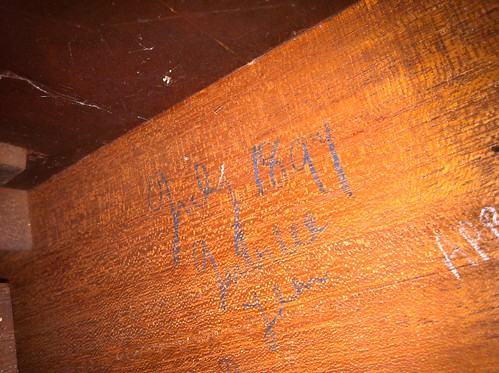
    Incidentally, that looks to me like July 1891 Jubilee. I got quite excited for a second by the concept that it might have been for the Austro-Hungarian jubilee exhibition. I mean, that would be pretty nifty, but July’s too late. That was in May. The only Jubilee I know of in 1891 is Punch magazine, and what they’d be doing with a Piano from a small piano maker I don’t know, so I can’t imagine an obvious connection there. I’ve always been intrigued, though, by that marking.

    Anyhow, she now sounds like a piano. I’m sure professional musicians would be sadly disappointed in what I consider adequately in tune. But I am satisfied that she sounds like a piano.

    Sufficiently so that I spent some time attacking the ivories**. First Tom Lehrer, because I need some inspiration. Then some ‘Joy of Piano’ simplified fluff – but what was pleasing about that was that despite my keyboard ineptitude, something akin to music did come out at several points. It was, at least, not totally unrecognisable. I had some idea that it was (a) music and (b) a chunk of the New World Symphony.

    Which was enormously gratifying. Sufficiently so that despite my achy fingers, I shall endeavour to continue this ‘practicing’ m’larkey up.

    Ivories tickled... On with the rest of the day :)

    In other news. Rebecca. *sigh*.

    What to do with a problem like Rebecca.

    No, seriously. Taking a step back and reducing the panic to a more manageable level, because staring a massive bill in the face (and weeping) is what I’ve been trying to contend with. What I have to remember, and tend to forget, because I’m ridiculously impatient, is that I don’t need her back on the road right now. Yes, I want her back on the road. Yes, I do. Because I like driving my beloved minor. It’s that simple.

    But that is not actually a requirement. We/I am not without transport. I have Molly to get around the city on, and Chester for longer trips. Kathryn, despite the train’s many failings*** take Chester only on Sundays when the train service moves from overpriced bucket of crap to unusable bucket of crap (with a free side of insultingly overpriced).

    So. Stepping back, let’s look at the big picture.

    The big picture is the Warp 9″ motor going in once we’re in Canada; until then we’re going to keep using the 1275 with a fast-road-cam. This engine is marginal on the standard Morris/Wolsey/Riley diff. Those diffs were mated with, and were considered just-strong-enough for 83ft/lb torque and 55bhp (more or less; the rated output of a 1.5l B series engine), the engine in Rebecca should give about 75ft/lb and 70bhp. So theoretically, if I drive ‘like a nun’, it should hold together. And I don’t tend to thrash her wildly anymore, because I’m not in that much of a hurry to get anywhere.

    However, putting in a standard diff with the 9″ Warp motor is going to be hysterically metal shaving inducing. That dinky little electric motor (which I can’t lift) provides 152ft/lbs of torque and 82Hp. That will turn the standard diff into powdered metal quicker’n I can get the car off the ramps. So that’s a big fat no.

    But what has been flagged up to me is that Volvo 240s do a very nice limited slip differential, which comes in a range of ratios (an insanely large range of ratios) and are built like battleships. They’re unpopular only insofar as no-one ever needs to replace them (apart from the guys who use them to build hot-rods and thrash them mercilessly).

    I’ve let the Capri axle I was looking at go, because it’s apparently an English diff, not an Atlas one, and that would have been a touch marginal on the torque/strength side. I suspect my dad’s Escort, which ate diffs, probably had the English Diff, judging by the comments from the rallying crowd. (If anyone ever sees SBH392R****, I’ve got some nice pics of her, although I imagine she’s scrap by now. Easily recognisable, said ‘FOFD’ on the boot, thanks to Ford’s awesome quality control).

    Anyway, meandering somewhat.

    So, the question is, do I try and pick up a Volvo 240 axle (complete with axle etc), get it shortened (apparently you can get it shortened to minor lengths without trimming the half shafts, which is excellent news), and mounts made, and a special prop shaft… now.

    Or do I spend 70-80 quid on a second hand diff of unknown provenance, and throw it in, and just see how I get on for the time being, and do the Volvo axle later.

    I’m tempted by getting her on the road, but really that’s a waste of money that I don’t have spare.

    Mmm.

    Needs more thought, I feel.

    Incidentally, the place I rang about Volvo parts don’t think they have a 240 axle in, at the moment…

    * I’m often stunned at how tolerant my parents were of me. Things I had that were of no use at all throughout my childhood included massive chunks of CTL Mini computers, A manual telephone exchange operator’s desk, a spare piano (in case, what, the other one rolled off or joined the circus?), and eventually a rusted out heap of a Morris Minor… more on that momentarily.

    ** I’d say ‘tickling’, but it was more like a masacre. I’d no idea how rusty I’d got. Then there are the terribly amusing pauses as I stare at the music and try and work out which note that is meant to be, and whether I’m playing it.

    *** And believe me, there are many and manifold ones.

    **** It’s funny how that plate has stuck in my head. I can’t remember the numbers off my mum’s Fiat 126 – that was HNK…Y, and the other cars my parents had never stuck with me. But the Fofd, that was bought because my mum was pregnant with me, and that old Austin A40 wasn’t big enough (also was rusting away – indeed the front wing was made, partially, out of wood, I’m told).